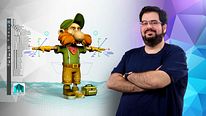
Introduction to Rigging for Animation
Course final project
A course by joseantoniomartinmartin , Lead Character TD and Rigger



About the final project for: Introduction to Rigging for Animation
Introduction to rigging for animation
“Once completed all the lessons now as a final project I encourage you to do a complete rig of a character as we have seen during the units. You can use both the same character that I used, the other that we have provided as a resource or even a model that you have. It is important to go step by step and checking that everything is correct, especially the initial part of the skeleton. If the orientation of the joints is not correct you will have problems later and failures will appear that will force you to discard parts made and check where the error is. Take your time at each step and ask in the forum if you have any questions. I will review the forums and I will assist you as much as possible, but be patient as some may take a couple of days to answer you, especially if I have to prepare a more elaborate answer. I also encourage you to help each other if you see that someone is stuck and you know the answer or have some idea of a possible solution. The best thing to show me your rig is that you make a video, either with a small animation or a screenshot, but you can see that you have built what we have given in the lessons. I encourage you to do the project because you will learn a lot. In the second course we will start from the rig of this course and we will see the deformation part. ”
Partial transcription of the video
“Well. now that we have finished the course. i'm going to summarize what we've covered. We started by explaining what a rigger is and then discussed concepts like joins. constraints. and controls. Then we explored the difference between IK and FK. Next. we have seen the placement of the character's skeleton. paying special attention to the orientation the joints. Once the skeleton was completed. we began creating the rig control structure for the model. We started with the leg rig. we prepared the joint chains. then created the IKFK control rig and the control RIG to toggle between IK FK. Fi...”
This transcript is automatically generated, so it may contain mistakes.
Course summary for: Introduction to Rigging for Animation
-
Category
3D & Animation -
Software
Maya -
Areas
3D Animation, Animation, Rigging

joseantoniomartinmartin
A course by
Jose Antonio Martín has been working as Lead Character TD for almost a decade. During this time, he has developed professionally as a rigger and character TD in companies including Framestore and MPC, which has paved the way to participate in blockbusters such as Gravity (Oscar winner for best VFX), Guardians of the Galaxy, Paddington, Edge of Tomorrow, Terminator Genesis, Suicide Squad, Independence Day: Resurgence, and Ghost in the Shell.
- 97% positive reviews (238)
- 5,298 students
- 37 lessons (6h 25m)
- 11 additional resources (7 files)
- Online and at your own pace
- Available on the app
- Audio: Spanish, English, French, Italian, Portuguese, Turkish
- Spanish · English · Portuguese · German · French · Italian · Polish · Dutch · Turkish · Romanian · Indonesian
- Level: Beginner
- Unlimited access forever
Recommended software & tools for this course
 Maya
MayaCategory
Areas