Introduction to Rigging for Animation
A course by joseantoniomartinmartin , Lead Character TD and Rigger




Learn to create the basic controls of a human character



Jose Antonio Martín - technical director of characters and rigger - has worked in major productions such as Gravity , Terminator Genesis , Suicide Squad or Ghost in the shell , specializing in the creation of assets. As rigger is responsible for the creation of the control structure of 3D models that allows animators to give life and move easily and naturally all kinds of characters, vehicles, objects, accessories ...
In this course, he will teach you how to create a skeleton and a control structure based on the 3D model of a character, which is usually called a "puppet". You will learn the bases for the creation of a complete rig for a human character: rig of legs, arms, torso, hands and head; and you'll see, too, how to make it work together.
What will you learn in this online course?
37 lessons & 11 downloads

- 97% positive reviews (240)
- 5,375 students
- 37 lessons (6h 25m)
- 11 additional resources (7 files)
- Online and at your own pace
- Available on the app
- Audio: Spanish, English, French, Italian, Portuguese, Turkish
- Spanish · English · Portuguese · German · French · Italian · Polish · Dutch · Turkish · Romanian · Indonesian
- Level: Beginner
- Unlimited access forever
Recommended software & tools for this course
 Maya
MayaWhat is this course's project?
You will make a small animation in which the rigging of your character will be shown.
Projects by course students


Who is this online course for?
Animators, riggers, 3D designers and anyone with an interest in the world of animation who wants to learn to perform the rigidity of a biped character.
Requirements and materials
No previous knowledge of 3D, animation or rigging is necessary, since Jose Antonio will explain all the concepts from the most basic, however, it is advisable to have previously used Autodesk Maya.
With respect to materials, you will need a computer in which you must have installed Autodesk Maya (although the concepts that will be explained during the course may be applicable to other 3D software).

Reviews

joseantoniomartinmartin
A course by
Jose Antonio Martín has been working as Lead Character TD for almost a decade. During this time, he has developed professionally as a rigger and character TD in companies including Framestore and MPC, which has paved the way to participate in blockbusters such as Gravity (Oscar winner for best VFX), Guardians of the Galaxy, Paddington, Edge of Tomorrow, Terminator Genesis, Suicide Squad, Independence Day: Resurgence, and Ghost in the Shell.
Content
-
U1
Introduction
-
Presentation
-
Influences
-
-
U2
Basic notions
-
What is a rigger
-
Joints, controls, constraints and other basic elements 1
-
Joints, controls, constraints and other basic elements 2
-
Joints, controls, constraints and other basic elements 3
-
Joints, controls, constraints and other basic elements 4
-
Joints, controls, constraints and other basic elements 5
-
IK and FK
-
-
U3
Creation of the skeleton
-
Placement of the joints 1
-
Placement of the joints 2
-
Placement of the joints 3
-
Placement of joints 4
-
Check the orientation of the joints
-
-
U4
Rig of the legs
-
Preparation
-
Leg creation FK
-
Leg creation IK 1
-
Leg creation IK 2
-
IK 3 leg creation
-
Creation IK / FK Switch
-
Final details
-
-
U5
Rig of the arms
-
Preparation
-
Arm creation FK
-
IK arm creation
-
Creation IK / FK Switch
-
Rig creation of hand and fingers
-
Final details
-
-
U6
Rig of the torso
-
Preparation
-
Spine Creation FK
-
Spine Creation IK
-
Creation IK / FK Switch
-
Creation of neck and head rig
-
Creation of the control of the hip
-
-
U7
Completion of the rig
-
Cleaning the scene
-
Connect the model to the rig
-
Review scale of the rig
-
Space Switches
-
-
FP
Final project
-
Introduction to rigging for animation
-
What to expect from a Domestika course
-
Learn at your own pace
Enjoy learning from home without a set schedule and with an easy-to-follow method. You set your own pace.
-
Learn from the best professionals
Learn valuable methods and techniques explained by top experts in the creative sector.
-
Meet expert teachers
Each expert teaches what they do best, with clear guidelines, true passion, and professional insight in every lesson.
-
Certificates
PlusIf you're a Plus member, get a custom certificate signed by your teacher for every course. Share it on your portfolio, social media, or wherever you like.
-
Get front-row seats
Videos of the highest quality, so you don't miss a single detail. With unlimited access, you can watch them as many times as you need to perfect your technique.
-
Share knowledge and ideas
Ask questions, request feedback, or offer solutions. Share your learning experience with other students in the community who are as passionate about creativity as you are.
-
Connect with a global creative community
The community is home to millions of people from around the world who are curious and passionate about exploring and expressing their creativity.
-
Watch professionally produced courses
Domestika curates its teacher roster and produces every course in-house to ensure a high-quality online learning experience.
FAQs
What are Domestika's online courses?
Domestika courses are online classes that allow you to learn new skills and create incredible projects. All our courses include the opportunity to share your work with other students and/or teachers, creating an active learning community. We offer different formats:
Original Courses: Complete classes that combine videos, texts, and educational materials to complete a specific project from start to finish.
Basics Courses: Specialized training where you master specific software tools step by step.
Specialization Courses: Learning paths with various expert teachers on the same topic, perfect for becoming a specialist by learning from different approaches.
Guided Courses: Practical experiences ideal for directly acquiring specific skills.
Intensive Courses (Deep Dives): New creative processes based on artificial intelligence tools in an accessible format for in-depth and dynamic understanding.
When do the courses start and when do they finish?
All courses are 100% online, so once they're published, courses start and finish whenever you want. You set the pace of the class. You can go back to review what interests you most and skip what you already know, ask questions, answer questions, share your projects, and more.
What do Domestika's courses include?
The courses are divided into different units. Each one includes lessons, informational text, tasks, and practice exercises to help you carry out your project step by step, with additional complementary resources and downloads. You'll also have access to an exclusive forum where you can interact with the teacher and with other students, as well as share your work and your course project, creating a community around the course.
Have you been given a course?
You can redeem the course you received by accessing the redeeming page and entering your gift code.
 Maya
Maya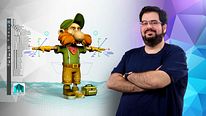
no pude finalizar el curso ya que esta muy desactualizado. no lo recomiendo para las ultimas versiones . deberían aclarar cuanto tiempo tienen los videos por que si sabia antes no lo compraba directamente
Buen curso! Me sirivó para pasar Animación
El curso esta bastante desactualizado. No lo recomiendo si están usando cualquier versión de maya actualizado. Es mas. No deberia estar este curso en Domestika por esa razón. Estoy en la unidad 3 y no se que hacer porque la herramienta que utiliza no funciona en mi version actual de Maya. Pare eso mejor me veo un video en youtube..
muy bueno practico
The course is not bad however, can't recommend it as of April 2025, the course includes custom tools in which the videos rely heavily to go through, thing is those tools are not functional in newer versions of maya, and there is not information on how to do what the instructor is doing without the custom tools, may need to update those files to make them functional.