VR Design and Modeling with Quill
A course by Federico Moreno Breser , Animation Director and Digital Artist


Transform the way you work in 3D by creating characters and scenes with the power of virtual reality
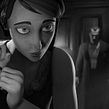

If painting and modeling characters and scenes in 3D on a real scale inspires you, imagine being able to be physically present in your own creations, walk around them, and see them in their actual size in order to perfect them. Oculus Quill is the painting and 3D animation software for virtual reality that's capable of creating that unique experience, and Federico Moreno—animation director and digital artist—is the expert that will present this powerful tool to create your project using his own methodology.
With his vast experience in working with clients like Disney, Ford, UNICEF, YPF, Netflix or TVE, among others, Federico will teach you how to master Oculus Quill so you can create your own universe and animated content. Learn all the functions and processes to work with the software step-by-step, until you create your own finished 3D project.
What will you learn in this online course?
28 lessons & 23 downloads
- 97% positive reviews (34)
- 1,241 students
- 28 lessons (5h 5m)
- 23 additional resources (11 files)
- Online and at your own pace
- Available on the app
- Audio: Spanish
- Spanish · English · Portuguese · German · French · Italian · Polish · Dutch · Turkish · Romanian · Indonesian
- Level: Beginner
- Unlimited access forever
Recommended software & tools for this course
 Adobe Photoshop
 OctaneRender
 Oculus Quill
 Unreal Engine
What is this course's project?
Build a complete scene from scratch, by designing the scene and characters in Quill and render them in OctaneRender.

Who is this online course for?
For all audiovisual artists with or without previous experience in the world of animation and 3D creation. Students who are training to become professionals in the industry can discover new tools and processes presented in the course.
Requirements and materials
The course doesn’t require previous artistic or technical skills, however, those with experience in visual arts and in animation software and 3D creation will find the course easier.
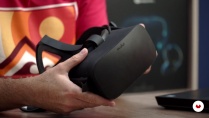
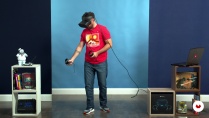
Regarding the course materials, you will need an Oculus Rift or Oculus Rift S headset, Touch Controllers and Oculus Quill, Adobe Photoshop, and system requirements for working with Quill at the beginning of the course. However, we recommend that you take a look at the optimum requirements for Quill on their official website.

Reviews

Federico Moreno Breser
A course by Federico Moreno Breser
Federico Moreno is passionate about the freedom that animation gives him to bring his imagination to life and give shape to a story, compared to other audiovisual fields. With over twenty years of professional experience, he admits today that most of what he has learned was self-taught, after endless hours of practice, tutorials, and videos.
He has directed Mcfly Studio since 2005, a studio specialized in animation and audiovisual production, where his two sides of expertise meet: the artist and producer. In 2012, he founded the animation magazine Moushon!, a project that he led for two years, and Luty Art Studio alongside Nelson Luty, an art department dedicated to conceptual art for the film industry, animation, and video games.
Content
-
U1
Introduction
-
Presentation
-
Influences
-
What will we do in the course?
-
-
U2
Configuration and planning
-
Hardware presentation and technical requirements
-
VR equipment setup and configuration
-
Introduction to the Quill Tool
-
The Transform tool and its role
-
Working with Layers
-
Brushes and Clone tool I
-
Brushes and Clone tool II
-
Customize our interface
-
-
U3
Working at Quill
-
We work with references
-
Character Creation: The Head I
-
Character Creation: The Head II
-
Body Arming I
-
Body Arming II
-
We paint the character
-
We do the poses I
-
We do the poses II
-
Scenarios bases
-
Creation of the arcade
-
Scenario Details
-
-
U4
Polishing our project
-
Final scenario composition
-
We export from Quill
-
We integrate the project to OctaneRender I
-
We integrate the project to OctaneRender II
-
Materials and lights in OctaneRender
-
Final export
-
-
FP
Final project
-
VR Design and Modeling with Quill
-
What to expect from a Domestika course
-
Learn at your own pace
Enjoy learning from home without a set schedule and with an easy-to-follow method. You set your own pace.
-
Learn from the best professionals
Learn valuable methods and techniques explained by top experts in the creative sector.
-
Meet expert teachers
Each expert teaches what they do best, with clear guidelines, true passion, and professional insight in every lesson.
-
Certificates
PlusIf you're a Plus member, get a custom certificate signed by your teacher for every course. Share it on your portfolio, social media, or wherever you like.
-
Get front-row seats
Videos of the highest quality, so you don't miss a single detail. With unlimited access, you can watch them as many times as you need to perfect your technique.
-
Share knowledge and ideas
Ask questions, request feedback, or offer solutions. Share your learning experience with other students in the community who are as passionate about creativity as you are.
-
Connect with a global creative community
The community is home to millions of people from around the world who are curious and passionate about exploring and expressing their creativity.
-
Watch professionally produced courses
Domestika curates its teacher roster and produces every course in-house to ensure a high-quality online learning experience.
FAQs
Quill is a virtual reality software designed for creating immersive 3D illustrations and animations. It lets artists and animators work within three-dimensional environments, model characters, compose scenes, and streamline their creative process directly in VR.
Advanced experience isn’t required, but intermediate knowledge of digital art or animation is recommended. This course is aimed at those who already understand basic illustration concepts and want to explore artistic production in VR.
You’ll need a VR-ready PC, an Oculus Rift or Rift S headset, VR controllers, and a safe physical space. A powerful graphics card and up-to-date operating system are recommended for optimal performance.
You’ll learn how to model, paint, and animate characters in Quill, build complex scenes, optimize your VR workflow, add visual references, and export projects for rendering in Octane. You’ll also develop stylization and narrative composition techniques.
The course provides step-by-step guidance on connecting cables, pairing controllers, adjusting lenses, setting up the SafeGuardian boundary, and calibrating your VR workspace height and safety.
Quill lets you animate characters through 3D posing, geometry manipulation, and grouping strokes. You can create expressive movements without relying on traditional bone systems.
In Quill, you can import images and 3D models to use as references or add details to your scenes, helping maintain design accuracy and visual consistency in complex projects.
 Adobe Photoshop
 OctaneRender
 Oculus Quill
 Unreal Engine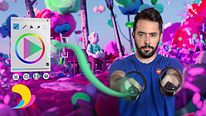
bastante interesante el tema, y muy conveniente que este en español
Impresionante !!!! Es otro mundo y nunca mejor dicho el poder trabajar con herramientas virtuales. Yo tuve que cambiar la computadora para más potencia y poder trabajar con este tipo de tecnología. Adictivo
Super recomendado, incluso así no tenga tanto soporte ahora el software de Quill
Muy recomendado :D
La profesionalidad del instructor se nota, puede que de un poco de Motion Sickness al seguir la camara, pero si se sigue directo en VR se evita totalmente. Recomendad'isimo el curso, tengo ganas de acabarlo y seguir con el siguiente modulo de animacion.