


Web Design Tutorial: 6 Writing Tips That Designers Need to Know

Learn how users read a page and why it’s important that designers understand copywriting, with James Eccleston
Though you might not realize it, copywriting is an essential skill in the toolkit of a successful web designer. Understanding the basic principles of copywriting, and how it informs how people interact with a page, offers great insights that can be applied to design. This can improve SEO, increase conversion, and also make your website more aesthetically pleasing.
As brand and UX specialist James Eccleston (@james80) explains, web designers don’t need to replace copywriters, but by having a greater understanding of how copywriting works they can enrich their designs and coordinate more effectively with their teams.
In the video below, he explains the six writing tips that designers need to know in order to create interesting and engaging web pages.

The 6 Writing Tips Designers Need to Know
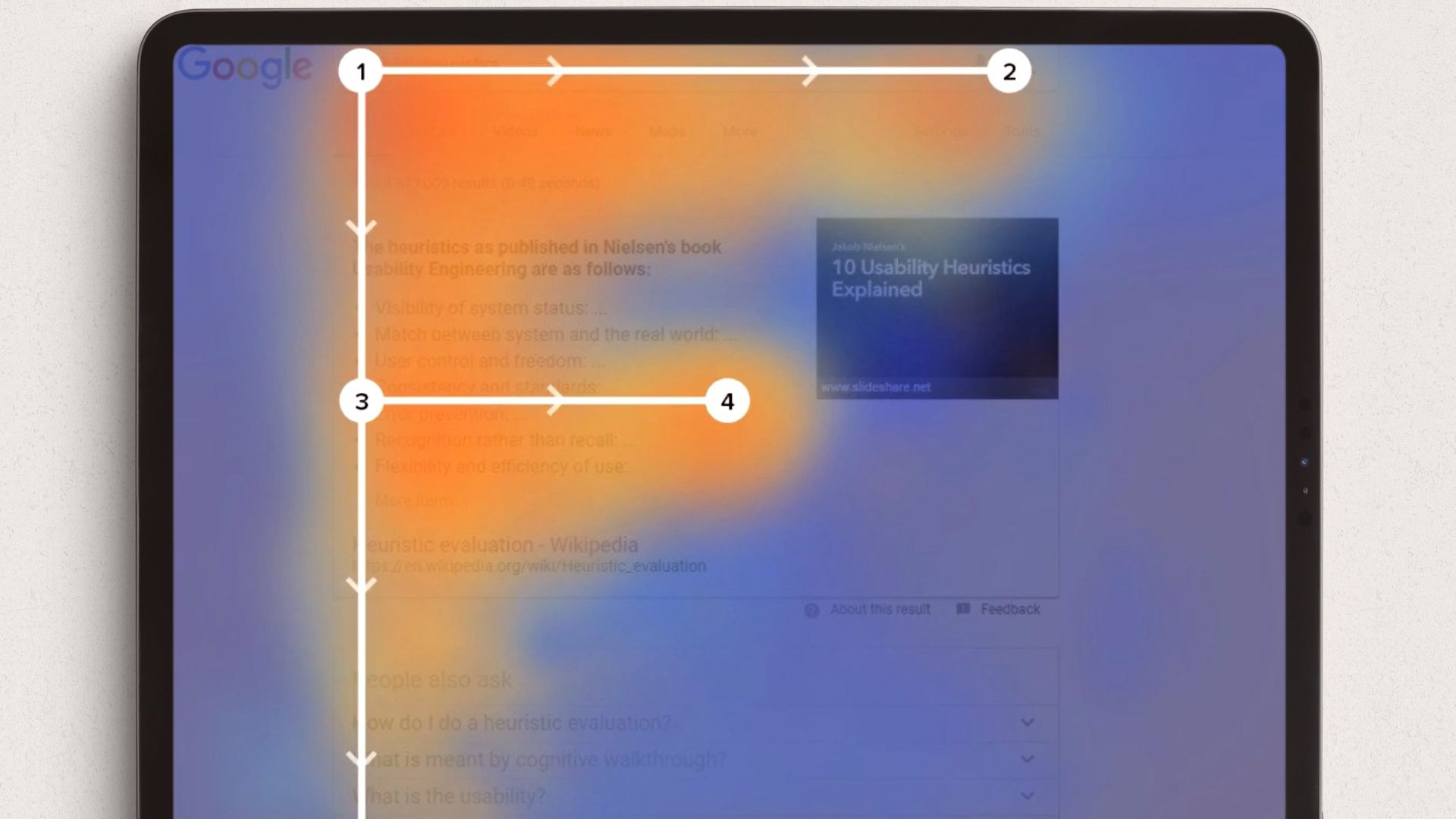
1. Understand how people read websites and how that influences visual design
Eye tracking shows the most common way users read a webpage is in a “F” shape. That means their eye scans across the top of the page, goes down, scans across, and then moves further down.
Using this information, designers can decide where to place the most important pieces of text and can also get a sense of how far down a page people are likely to read.
2. Know your audience and speak in their language, using words and phrases that make sense to them
Be careful not to use jargon that your target audience won’t immediately understand. A good way to present information so that it is accessible is to use the inverted pyramid, which is a popular writing concept. With this model, the most important information goes at the top, answering why, how, what, who, and where. This is where you present the most juicy part of your pitch, keeping it short and snappy.
Then, as the user moves down the page, the text begins to include other important details, such as how your product or main service works.
Finally, at the bottom, you can include longer pieces of text, which are relevant but perhaps not very engaging. In this way, users will have access to all relevant information but are also able to easily access top-line ideas before deciding if they need to know more.

3. Make your copy short and scannable
There are a few ways to shorten your copy so that it’s easier to quickly read and absorb. These techniques will also impact the visual weight of the text, thus helping to shape the aesthetics of your site.
Try to break blocks of text into chunks, each of which has a subheadline which instantly signals what important information can be found there. As users read, following that “F” shape, these titles will allow them to quickly absorb the content.
Another way to break up text is to use images and white space, which help to separate the text into easily digestible blocks, making it appear more attractive.

4. Create a strong call to action
It’s very important to keep your call to actions short, succinct, and action based. The placement and legibility of these calls to action are a crucial part of your web design, since the ultimate purpose is to guide your users to them. Things like “Apply Now”, “Download”, or “Find Out More” are great options.
5. Have a conversation with the user, and consider context
Using inclusive language like “us”, “we”, or “you” helps create a sense of closeness with your reader and can make your site more comfortable to interact with. Depending on what the page is dedicated to, your tone will also adjust accordingly. For instance, a legal disclaimer page will read differently than a friendly or humorous About Us page meant to create a sense of closeness with potential clients.
6. Build internal links
Rather than trying to cram as much text and information on a single page as possible, don’t be afraid to make more pages that offer that content and then linking to them. For instance, if sustainability is an important keyword for you, create a link where that word leads to a page where you discuss it in more detail. This will help make your pages easier to read, without sacrificing information users might find interesting, and internal links will also improve your SEO.
If you want to learn more about how to develop a powerful brand concept and apply it to a website, check out James Eccleston's online course, Brand Strategy for Online Platforms.
You may also like:
- What Does a Web Designer Do?
- What Is a Design System and How Can I Use One in My Digital Projects?
- Squarespace Tutorial: How to Choose the Right Template for You
- Introduction to Adobe XD, a course by Ethan Parry
- Introduction to UX Design, a course by Ethan Parry


0 comments