


What Is Facebook Business Manager and What Advantages Does It Offer

This tool allows you to optimize the way you communicate with your followers on social networks
Facebook started out as a social network designed to connect people, but, over time, it has also shaped the way we interact with brands. Increasingly, companies have found a niche for themselves on Facebook, and the platform has adapted to their communication needs by creating tools such as Facebook Business Manager.
What is Facebook Business Manager?
In 2014, Facebook launched a tool that allowed companies to create pages and manage their marketing strategies within the social network. With it, Facebook Business Manager was born and with it a whole range of possibilities when working with company pages and advertiser accounts.

What are the advantages of using Facebook Business Manager?
The main benefit of using this Facebook tool is that it offers you the ability to manage all your marketing campaigns and strategies. You can also track the performance of the ads you have made on the social network and obtain valuable data from your advertising investments.
It is also extremely useful for controlling the access level of the different team members that manage a Facebook page or campaign.
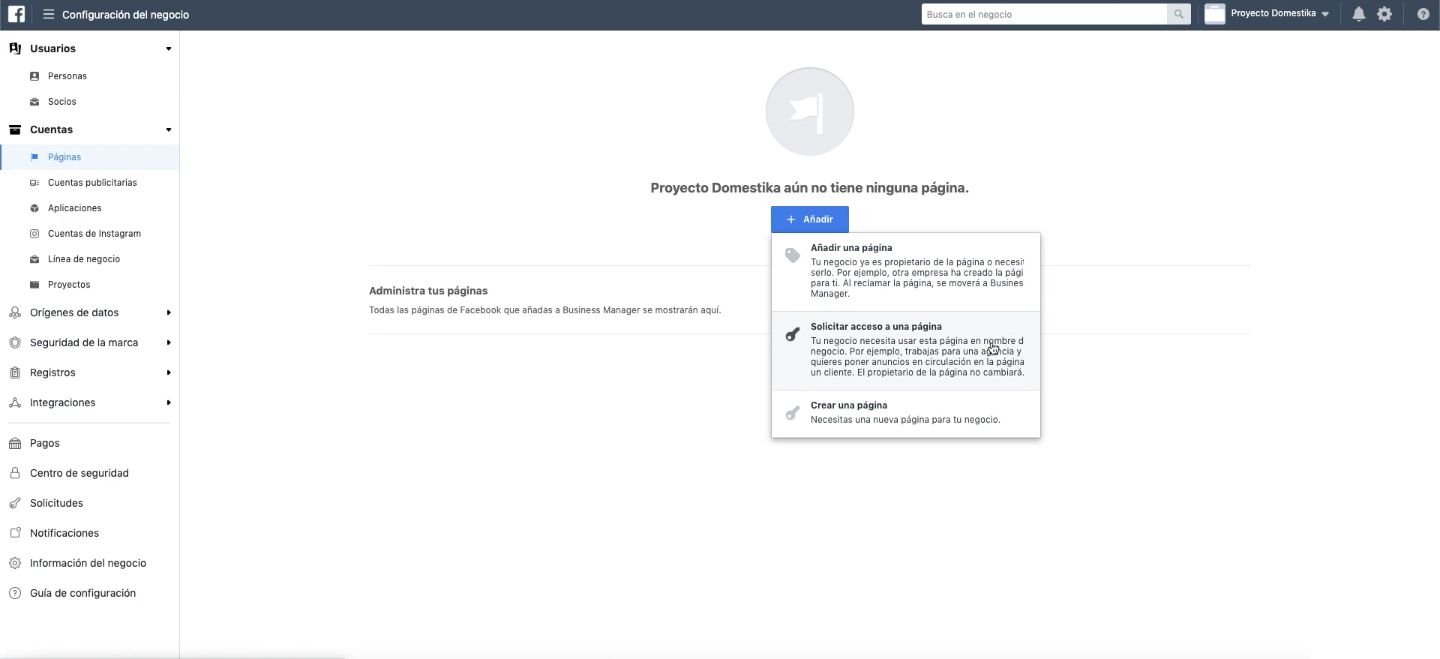
These are the options that Facebook Business Manager gives you:
· People: allows you to control who has access to all Facebook accounts and pages, and assign access levels to the team. Very useful for agencies or teams with several profiles that need to be managed with specific permissions.
· Pages: this is the place where you can add or create a Facebook page, and launch promotions tied to them using the Business Manager tools.
· Advertising accounts: As with pages, this tool allows you to manage an existing advertising account or create a new one. In addition, you must specify if you are interested in advertising your own projects and services or if you will create campaigns for other companies or people. From here, you can also issue the necessary permissions to other members of the team.
What do you need to start using Facebook Business Manager?
Obviously, the first thing you need to start using this tool is a personal Facebook account. Also, you need to create a Facebook page for the company, brand, or product that you want to advertise. Once you have configured both, you can launch your Facebook Business Manager profile and start working with it.
How to create an account on Facebook Business Manager:
- Go to business.facebook.com, click on the "Create account" option, and fill in the requested information.
- One of the options that you'll have is to set the account to promote your own services or to provide promotion services to other businesses. This last option is the one used by agencies that work with various companies.
- After confirming your account through the email that Facebook will send you, you will be able to access your Facebook Business Manager profile and all the options the tool offers.

In the Domestika course, Google Ads and Facebook Ads from Scratch, Arantxa & Guille will teach you how to configure your Facebook Business Manager and everything you need to know about advertising on social networks.
English version by @angeljimenez.
You may also like:
- 5 Personal Branding Courses to Boost Your Brand Online
- 5 Instagram Stories Hacks You Probably Don't Know
- Tips to Create Your Own Digital Media Plan


0 comments