Character Modelling in Maya
A course by Fer Aguilera Reyes , Illustrator and 3D Generalist



Learn to conceptualize and illustrate characters in 3D

Fernando Aguilera, illustrator and 3D artist, never tires of exploring new tools and ways to bring his characters to life. Both for his professional assignments and his personal projects, he always tries to optimize resources to obtain impeccable results.
In this course, discover his character-conceptualization and modeling process, learning several tricks to reduce rendering and modeling times using the new Maya 2017 tools beyond the conventional outline of the work process.
What will you learn in this online course?
26 lessons & 13 downloads
- 98% positive reviews (198)
- 3,894 students
- 26 lessons (5h 19m)
- 13 additional resources (6 files)
- Online and at your own pace
- Available on the app
- Audio: Spanish, English, French, Italian, Portuguese, Turkish
- Spanish · English · Portuguese · Italian · French · Turkish
- Level: Intermediate
- Unlimited access forever
Recommended software & tools for this course
 Adobe Photoshop
 Maya
MayaWhat is this course's project?
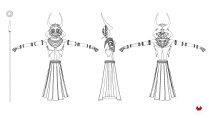
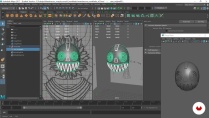
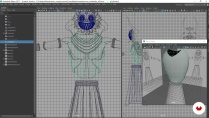
Illustrate a character in Maya, from the basic structure to the post-production in Photoshop. In addition, Fernando guides you in the process of creating one of his personal illustrations: Mambacore.
Projects by course students


Who is this online course for?
This course is for illustrators, animators, designers, and 3D artists who want to improve their character-modeling skills in Maya.

Requirements and materials
You must have basic knowledge of Maya, be familiar with basic 3D-modeling processes, and know how to use an image-editing program such as Photoshop or similar.
You need to have Maya 2017 or later installed and any version of Photoshop.
Reviews

Fer Aguilera Reyes
A course by Fer Aguilera Reyes
Fernando Aguilera is an illustrator and 3D artist. His works are characterized by his use of color and exaggerated figures.
Fernando is passionate about 3D illustration. He is fascinated by the freedom that modeling gives him when it comes to discovering new processes and tools. In fact, his work process differs depending on the project at hand, since he focuses more on the idea and how to carry it out than on continuously polishing the same technique.
Throughout his career as a 3D artist and illustrator, he has worked in different fields. At Rockstar VFX he collaborated with the advertising department, at Zebra Studio he developed his work as a 3D generalist, at Lienzo he modeled for video games, and at Huevo Cartoon he worked as a lightning artist.
Content
-
U1
Introduction
-
Presentation
-
Influences
-
-
U2
Preparation of Interface and Project Folder
-
Mambacore and the process used
-
Basic interface and how to create a project folder
-
-
U3
Modeling in "T" pose
-
Modeling Theory
-
Masks I
-
Masks II
-
Body I
-
Body II
-
Arms and Hands I
-
Arms and Hands II
-
Extras (Pens, nuts and spear)
-
-
U4
Modeling with Instances and Mash
-
Instances, Mash and Patterns of the Feathers
-
Skirt
-
Feathers of the Mask
-
The horns
-
-
U5
Rigs, Posed and Final Details
-
Rig of the Feathers
-
Body Rig I
-
Body Rig II
-
Camera and Process of Posed
-
Final stand, extra details and cables
-
-
U6
Render and Postproduction
-
Initial settings and Lighting
-
materials
-
Passes for Postproduction and Final Adjustments
-
Postproduction in Photoshop
-
Postproduction in Photoshop II
-
-
FP
Final project
-
3D illustration in Maya
-
What to expect from a Domestika course
-
Learn at your own pace
Enjoy learning from home without a set schedule and with an easy-to-follow method. You set your own pace.
-
Learn from the best professionals
Learn valuable methods and techniques explained by top experts in the creative sector.
-
Meet expert teachers
Each expert teaches what they do best, with clear guidelines, true passion, and professional insight in every lesson.
-
Certificates
PlusIf you're a Plus member, get a custom certificate signed by your teacher for every course. Share it on your portfolio, social media, or wherever you like.
-
Get front-row seats
Videos of the highest quality, so you don't miss a single detail. With unlimited access, you can watch them as many times as you need to perfect your technique.
-
Share knowledge and ideas
Ask questions, request feedback, or offer solutions. Share your learning experience with other students in the community who are as passionate about creativity as you are.
-
Connect with a global creative community
The community is home to millions of people from around the world who are curious and passionate about exploring and expressing their creativity.
-
Watch professionally produced courses
Domestika curates its teacher roster and produces every course in-house to ensure a high-quality online learning experience.
FAQs
You’ll learn modeling, texturing, rendering, and 3D animation techniques—from character concept development to building digital portfolios and managing projects in Maya and other leading tools.
This is an intermediate-level course, perfect if you already have basic modeling or digital art skills and want to refine your 3D abilities and professional workflows.
You’ll need a computer that can run Maya, ZBrush, Substance Painter, Arnold, and Photoshop, plus internet access and basic digital art knowledge.
You’ll be able to work as a 3D modeler, texture artist, animator, or renderer in game studios, film, animation, advertising, or freelance on collaborative projects.
The course teaches you how to interpret visual references, create anatomical models, apply textures and materials, and set up basic rigs for animation using current tools and techniques.
Yes, you’ll learn to use MASH and instancing networks to create complex patterns, distribute repeated elements, and streamline your 3D modeling workflow.
You’ll develop personal and group projects, learn how to professionally showcase your models and renders, and document your process to stand out in the industry.
 Adobe Photoshop
 Maya
Maya

Muy claro!
Amazing course
Me pareció muy claro, y bueno para empezar este mundo.
si, muy bueno!
excelente