Guided Project: Colorful Vector Illustration in Adobe Illustrator
Course final project
A guided course by Pietari Posti / Studio Posti

Joined April 2002

Joined April 2020



About the final project for: Guided Project: Colorful Vector Illustration in Adobe Illustrator
GP: Colorful Vectorial Illustration
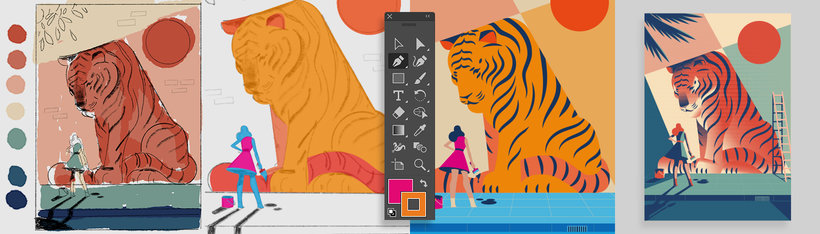
“The goal of this project is to apply all the techniques learned throughout the course to create a colorful and well-composed vector illustration. You will follow a structured process that includes conceptualization, sketching, color application, and final touches. Project Description You will create an original illustration by following these steps: Research and References: Look for visual references that inspire you and analyze compositions and color palettes that can enhance your work. Initial Sketches: Create thumbnail sketches to explore different compositions and designs. Refined Sketch: Choose the best concept and create a more detailed and polished sketch. Digitization and Basic Shapes Drawing: Import your sketch into Illustrator or Procreate and start constructing the illustration using basic shapes. Color Application: Define your color palette and apply flat colors to the main elements. Effects and Details: Add gradients, shadows, and highlights to give depth and dynamism to your illustration. Refinement and Final Adjustments: Ensure that all details are well-defined and the composition is balanced. Exporting: Save your illustration in suitable formats for both digital and print use. Final Submission To complete the project, you will submit the following: A document with visual references and initial sketches. The final illustration in digital format (PNG, JPG, or SVG). A high-resolution version ready for print. A process log with screenshots or photos of each stage (sketches, digitization, color application, and final adjustments). Tips for Success Spend time researching to strengthen your visual concept. Experiment with different color combinations and effects. Use keyboard shortcuts in Illustrator to streamline your workflow. Remember to check the size and resolution when exporting. Now is your time to shine! Create an illustration that reflects your style and creativity while applying all the techniques learned in the course. Share all images of your process so others can see your progress and learn with you. Have fun with the process!
Course summary for: Guided Project: Colorful Vector Illustration in Adobe Illustrator
-
Category
Illustration -
Software
Adobe Illustrator -
Areas
Digital Illustration, Editorial Illustration, Traditional illustration, Vector Illustration

Pietari Posti / Studio Posti
A guided course by Domestika
- 100% positive reviews (5)
- 343 students
- 6 lessons (1h 11m)
- 19 additional resources (8 files)
- Online and at your own pace
- Available on the app
- Audio: English, Spanish
- Spanish · English · Portuguese · German · French · Italian · Polish · Dutch · Turkish · Romanian · Indonesian
- Level: Beginner
- Unlimited access forever
Recommended software & tools for this course
 Adobe Illustrator
Category
Areas