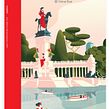
Guided Project: Colorful Vector Illustration in Adobe Illustrator
Drawing the Basic Elements 2
A guided course by Pietari Posti / Studio Posti

Joined April 2002

Joined April 2020



About the video: Drawing the Basic Elements 2
Overview
“Let's delve into how to draw the main elements on their own layers. ”
In this video lesson Domestika addresses the topic: Drawing the Basic Elements 2, which is part of the Domestika online course: Guided Project: Colorful Vector Illustration in Adobe Illustrator. Master dynamic vector illustration by focusing on color, composition, and creative design with Adobe Illustrator.
Partial transcription of the video
“Let's make it a little bit bigger, the breast part. with more curve into The hand has moved a little bit, so let's bring it. up again. Okay, so we have the girl traced now. We can actually trace paint bucket next to the girl and the same layer as well, because it's just a little small secondary element. It doesn't matter. So I'll use the ellipse tool again. And Option click. to copy below to make the shape of the pocket. Pick another color. Pink. take the pen to and trace the corners. Then what I do is to select the lower part and the body. and join them together. So I'll go to the pant fin...”
This transcript is automatically generated, so it may contain mistakes.
Course summary for: Guided Project: Colorful Vector Illustration in Adobe Illustrator
-
Category
Illustration -
Software
Adobe Illustrator -
Areas
Digital Illustration, Editorial Illustration, Traditional illustration, Vector Illustration

Pietari Posti / Studio Posti
A guided course by Domestika
- 5.0 100% positive ratings (5)
- 443 students
- 6 lessons (1h 11m)
- 19 additional resources (8 files)
- Online and at your own pace
- Available on the app
- Audio: English, Spanish, French, Italian, Portuguese, Turkish
- English · Spanish · Portuguese · German · French · Italian · Polish · Dutch · Turkish · Romanian · Indonesian
- Level: Beginner
- Unlimited access forever
Recommended software & tools for this course
 Adobe Illustrator
Category
Areas