


Creative Tools: HTML

This is how the language websites are built with came to be
All the websites you have visited share a similar basic structure. Regardless of their complexity, they are built with programming languages that make a site have large or small fonts, bright colors, drop-down menus, or videos.
This is how the first, and still the most-used, website building language, HTML, came to be.

How did HTML begin?
Tim Berners-Lee is a British computer scientist and engineer. While conducting research at the European Organization for Nuclear Research (CERN), he had the idea of creating a computer network to facilitate scientific research. Thus, the World Wide Web was born in 1991.

Berners-Lee developed HTML as a tool to make it easier for scientists and researchers to share information. He started thinking about this concept in the early eighties, and in 1989 he had a complete proposal for a hypertext system.
How does it work?
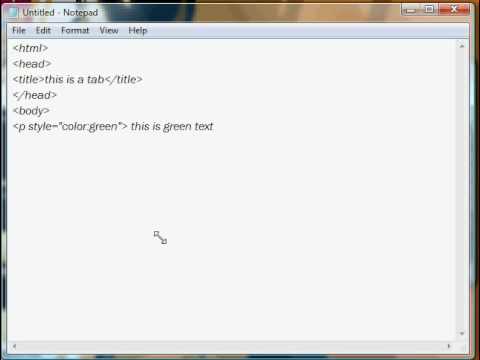
HTML stands for HyperText Markup Language. Very simply, HTML places tags that tell a browser what a website should look like. HTML gives structure to a website. It tells the browser if a text is a title or a heading, if it is a list or paragraph, if it is a link to another site, and so on.
In this example, you can see how tags tell a website what the content's structure is, and how these tags are always enclosed in square brackets <>.
Add-ons
Berners-Lee did not intend to create a definitive language for all websites. Its creation was limited to text because its target audience was researchers who needed to share text. Over time, other developers wanted to incorporate more elements into websites, such as videos or fonts, so they added new languages and formatting options.
Currently, most websites use two other languages that are integrated into the HTML specification:
- CSS, or cascading style sheet. This is the language that details what the website will look like in terms of colors, fonts, arrangements and other graphic design elements.
- Java Script. The language that allows you to have different experiences on each website. It allows animations, interactive features, buttons, etc.

Evolution
As the years went by, websites became incredibly popular (today, half of the world's population visits at least one website daily), and HTML added numerous features and improvements, with new tags that allowed makers to insert images, videos, or audio.
In 1992, Berners-Lee uploaded this photo of Les Horribles Cernettes, a fictional pop band made up of CERN employees: the first image to be shared on the web.

Anyone could learn this language in a few hours and publish their own website. In 1995 the second version of the language arrived, following the creation of the World Wide Web Consortium (W3C) a year earlier. This institution, currently managed by Berners-Lee himself, develops protocols and set the standards for web development.
The last language update came in 2017 and is known as HTML 5.2. With these new updates, it is possible to play videos or audio without running an external player, like Flash. It also allows a site to embed videos from other sites like YouTube or Vimeo.
Other features of the current version include:
- Details about the geographical location of people who visit a website.
- 2D animations.
- Formatting options especially designed for accessing a website on phones and tablets.
- Improved compatibility between browsers.
In this video, you can see which websites have been the most popular from 1996 to 2019.


0 comentários