


10 essential shortcuts to work in Adobe InDesign

Learning and using these keyboard shortcuts for Adobe InDesign will improve your workflow
InDesign is perhaps one of the most commonly used desktop publishing software these days. Numerous professionals and students use this tool every day to design and create both printed and digital documents but beyond the basic options for creating layouts, Adobe InDesign offers endless possibilities to create perfect publications.
A great layout designer knows how to work seamlessly with InDesign and the secret to working faster in your projects is to know the essential keyboard shortcuts of this software. Download below a PDF file with these shortcuts for Mac and PC.
These are the key shortcuts you have to learn to work with Adobe InDesign:

- cmd + N. Probably the first command you'll use after opening Adobe InDesign because it’s the one to create a new document.
- Shift + cmd + P. It's the shortcut that adds a new page to your document.
F. Opens the "Frame" tool, which lets you create a rectangular, elliptical or polygonal placeholder where you can place images.
- M. Opens the "Rectangle" tool. Unlike the previous one, it creates a figure that can be changed in color and size, as if we were working in any design program, but that is not intended to contain images.
- cmd + D. It will open the file browser so you can select an image from your files and place it in the document. If you press these commands with a frame selected, the image will be placed within it. If you have not selected anything, you can place it wherever you choose and resize it to your liking.
- T. One of the essential elements of a publication is the text on the page and therefore the textbox creation tool is fundamental. You can access it just by pressing the letter T on your keyboard.
- V. As in other Adobe programs, pressing the letter V opens the "Move" tool, used to reposition any type of frame, text or element in the publication.
- cmd + move. Dragging an item from the document at the same time you press the CMD (or CNTRL) key on your keyboard will cause the selected item to be duplicated.
- Shift + Cmd + Alt + V. Pastes the item you've copied (cmd + c) in exactly the same place on the page of the document you are working on.
- W. Perhaps one of the most interesting keyboard shortcuts in InDesign. To change the display mode of the document just press the W key. This way this can access the preview of your publication and see the borderless layout without editing marks, exactly as it will be once saved or printed.
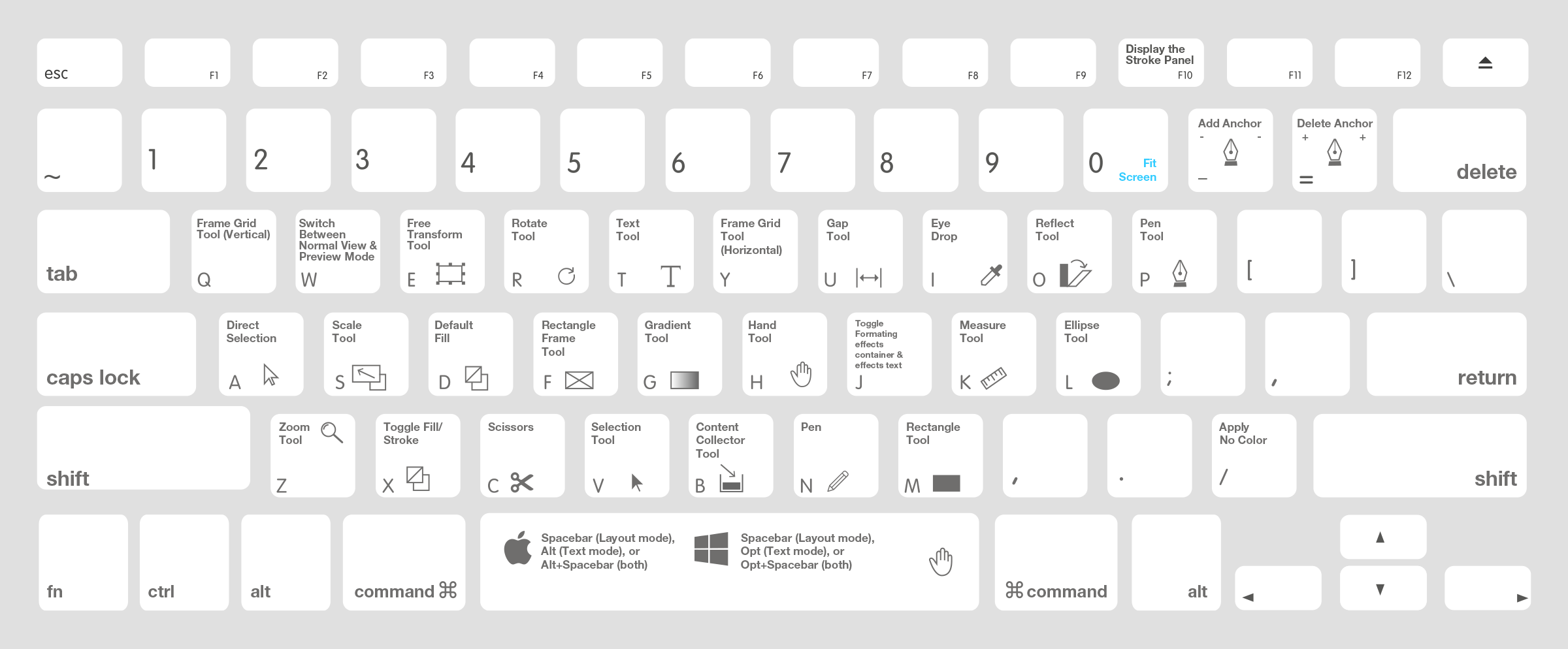
Download now the 10 essential shortcuts to work in Adobe InDesign (for Mac and Windows):
Înscrie-te gratuit și descarcă
Essential Shortcuts InDesign.pdf


1 comentariu