Food Photography: Creative Editing Techniques
A course by Lenka Selinger , Photographer and Food Stylist


Experiment with shapes, colors, and textures using digital tools to create mouthwatering images in your own artistic style

Food is a cultural and multisensory experience with the power to awaken memories and generate all kinds of positive emotions. Photographer and culinary artist Lenka Selinger's goal is to capture the essence of that universe. In this online course, she shares her editing secrets to create gastronomic scenes with a mouthwatering aesthetic.
Learn creative retouching techniques to maximize the effect of your food photos and master digital editing to achieve exquisite shapes, colors, and textures. These new tools allow you to go beyond the established presets, find a more personal vision, and carve out your own style.
What will you learn in this online course?
16 lessons & 14 downloads


- 100% positive reviews (19)
- 847 students
- 16 lessons (2h 28m)
- 14 additional resources (5 files)
- Online and at your own pace
- Available on the app
- Audio: Spanish
- Spanish · English · Portuguese · German · French · Italian · Polish · Dutch · Turkish · Romanian · Indonesian
- Level: Beginner
- Unlimited access forever
Recommended software & tools for this course
 Adobe Lightroom
 Adobe Photoshop
What is this course's project?
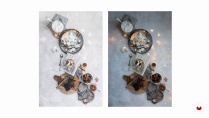
Edit and retouch an action-oriented tabletop image, a dark scene, and a recipe photo.

Who is this online course for?
This course is for food photography lovers.
Requirements and materials
To take this course, you need to have a basic working knowledge of Lightroom and Photoshop.
The materials you'll need are:
- - Lightroom
- Lightroom mobile
- Photoshop
- RAW images

Reviews

Lenka Selinger
A course by Lenka Selinger
Lenka Selinger is a photographer and food stylist who specializes in creating stunning culinary photos. She started this journey thanks to the food blog she kept while she was doing her PhD in neuroscience, as she spent her free time inventing new combinations and textures in the kitchen. This motivated her to further explore photography and experiment in the same way with visual combinations.
Years later, what had started out as a hobby became her profession, leading to collaborations with brands such as El Charro, Earth & Mama, Biochef, Magic Linen, and many more. She has also worked different jobs in advertising, creating images for magazines, restaurants, and cookbooks, and has even been recognized as the best food photographer in the world.
Content
-
U1
Introduction
-
Presentation
-
Influences
-
-
U2
Discovering Food Photography
-
Food Photography
-
Why Edit Photos?
-
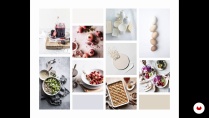
Mood Board
-
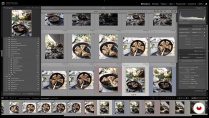
Catalog Organization
-
-
U3
Working in Lightroom
-
General Editing
-
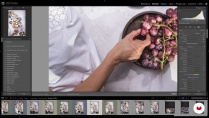
Selective Editing
-
Creative Editing
-
Creating Your Own Preset
-
Lightroom for Smartphones
-
-
U4
Working in Photoshop
-
Retouch Tools
-
Creating a Composition
-
Stop Motion Animation
-
-
U5
Final Details
-
Image Export
-
Visual Storytelling
-
-
FP
Final project
-
Food Photography: Creative Editing Techniques
-
What to expect from a Domestika course
-
Learn at your own pace
Enjoy learning from home without a set schedule and with an easy-to-follow method. You set your own pace.
-
Learn from the best professionals
Learn valuable methods and techniques explained by top experts in the creative sector.
-
Meet expert teachers
Each expert teaches what they do best, with clear guidelines, true passion, and professional insight in every lesson.
-
Certificates
PlusIf you're a Plus member, get a custom certificate signed by your teacher for every course. Share it on your portfolio, social media, or wherever you like.
-
Get front-row seats
Videos of the highest quality, so you don't miss a single detail. With unlimited access, you can watch them as many times as you need to perfect your technique.
-
Share knowledge and ideas
Ask questions, request feedback, or offer solutions. Share your learning experience with other students in the community who are as passionate about creativity as you are.
-
Connect with a global creative community
The community is home to millions of people from around the world who are curious and passionate about exploring and expressing their creativity.
-
Watch professionally produced courses
Domestika curates its teacher roster and produces every course in-house to ensure a high-quality online learning experience.
FAQs
Domestika courses are online classes that allow you to learn new skills and create incredible projects. All our courses include the opportunity to share your work with other students and/or teachers, creating an active learning community. We offer different formats:
Original Courses: Complete classes that combine videos, texts, and educational materials to complete a specific project from start to finish.
Basics Courses: Specialized training where you master specific software tools step by step.
Specialization Courses: Learning paths with various expert teachers on the same topic, perfect for becoming a specialist by learning from different approaches.
Guided Courses: Practical experiences ideal for directly acquiring specific skills.
Intensive Courses (Deep Dives): New creative processes based on artificial intelligence tools in an accessible format for in-depth and dynamic understanding.
All courses are 100% online, so once they're published, courses start and finish whenever you want. You set the pace of the class. You can go back to review what interests you most and skip what you already know, ask questions, answer questions, share your projects, and more.
The courses are divided into different units. Each one includes lessons, informational text, tasks, and practice exercises to help you carry out your project step by step, with additional complementary resources and downloads. You'll also have access to an exclusive forum where you can interact with the teacher and with other students, as well as share your work and your course project, creating a community around the course.
You can redeem the course you received by accessing the redeeming page and entering your gift code.
 Adobe Lightroom
 Adobe Photoshop
He aprendido muchísimo en este curso. Felicidades
Great course. Highly recommend!
This is a beautifully constructed course that shows you some really useful techniques in both Lightroom and Photoshop to enhance your food photography. The videos are well put together and Lenka explains her processes simply and comprehensively.
A very good way to make some big leaps in your food photography at a very good price. I highly recommend.
Ottima esperienza!
Un curso muy completo y muy bien explicado por Lenka. Aprendi muchisimo!