Professional Retouching for Product Photography in Photoshop
Optimizing products 1
A course by Mareike Keicher , Photo Editor



About the video: Optimizing products 1
Overview
“Now let's take a closer look at the products. I'll edit and tweak every single product so you can see exactly what I'm paying particular attention to in each case.”
In this video lesson Mareike Keicher addresses the topic: Optimizing products 1, which is part of the Domestika online course: Professional Retouching for Product Photography in Photoshop. Learn to make products pop with flawless photo edits, from the creation of sleek backgrounds and image optimization to the use of light gradients and textures.
Partial transcription of the video
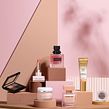
“optimize products In this lesson we will optimize the individual products. Now let's take a closer look at the products. Let's start with the Max Factor Palette. First we should clean up some things here. Be careful of glue residue to remove small annoying dots, hairs and scratches. Now let's make the black cap a little blacker. We also take out some color. Here we must ensure that the brown background areas not to be desaturated with. The blend means if in this case all pixels below may only be changed or desaturated if they have a certain darkness. At the lower black area we also want to ...”
This transcript is automatically generated, so it may contain mistakes.
Course summary for: Professional Retouching for Product Photography in Photoshop
-
Category
Photography & Video -
Software
Adobe Photoshop -
Areas
Photo Retouching, Photography, Photography Post-production, Product Photography

Mareike Keicher
A course by Mareike Keicher
Mareike Keicher is an expert in retouching and post-production who collaborates on a range of international projects. Her passion for photography with a high-end finish led her seamlessly into this profession, where she eventually specialized in beauty, hair, and product images in both the commercial and editorial sector. As a photo editor, she sees herself as a creative problem solver with complete responsibility over the final outcome of a piece.
The ability to adapt an image to taste while combining her personal style with the client brief is what keeps her inspiration alive. Her work has won her the trust of brands like L'Oréal, Douglas, and 8X4, with whom she has developed long-term collaborations.
- 76% positive reviews (29)
- 986 students
- 14 lessons (1h 47m)
- 22 additional resources (9 files)
- Online and at your own pace
- Available on the app
- Audio: German
- Spanish · English · Portuguese · German · French · Italian · Polish · Dutch · Turkish · Romanian · Indonesian
- Level: Beginner
- Unlimited access forever
Recommended software & tools for this course
 Adobe Photoshop
Category
Areas