Motion Graphics for Social Media: Create A Sticker Pack
A course by Alex FoxleyPhotographer, Illustrator, Graphic Designer, and Animator
A course by Alex Foxley, Photographer, Illustrator, Graphic Designer, and Animator

Unleash your creativity by designing your own animated stickers from scratch and amplify your social media presence
Social media stickers take on a whole new meaning when they are made by your own hand. Whether they are based on fact or fiction, the possibilities are endless. In this Domestika course, designer and art director Alex Foley teaches you how to make a dynamic set of stickers with your own unique designs.
Discover how to use Illustrator and After Effects to bring your motion graphics to life. Learn all there is to know about using vector lines to create animations, and use them to build a lively online presence.
What will you learn in this online course?
18 lessons & 14 downloads

Style Research and Existing References
6 minutes, 18 seconds

Techniques in After Effects for Creating GIFs
13 minutes, 18 seconds

Sketches
17 minutes, 15 seconds

Vectorization in Illustrator 1
12 minutes, 38 seconds

Working on After Effects 1
19 minutes, 50 seconds
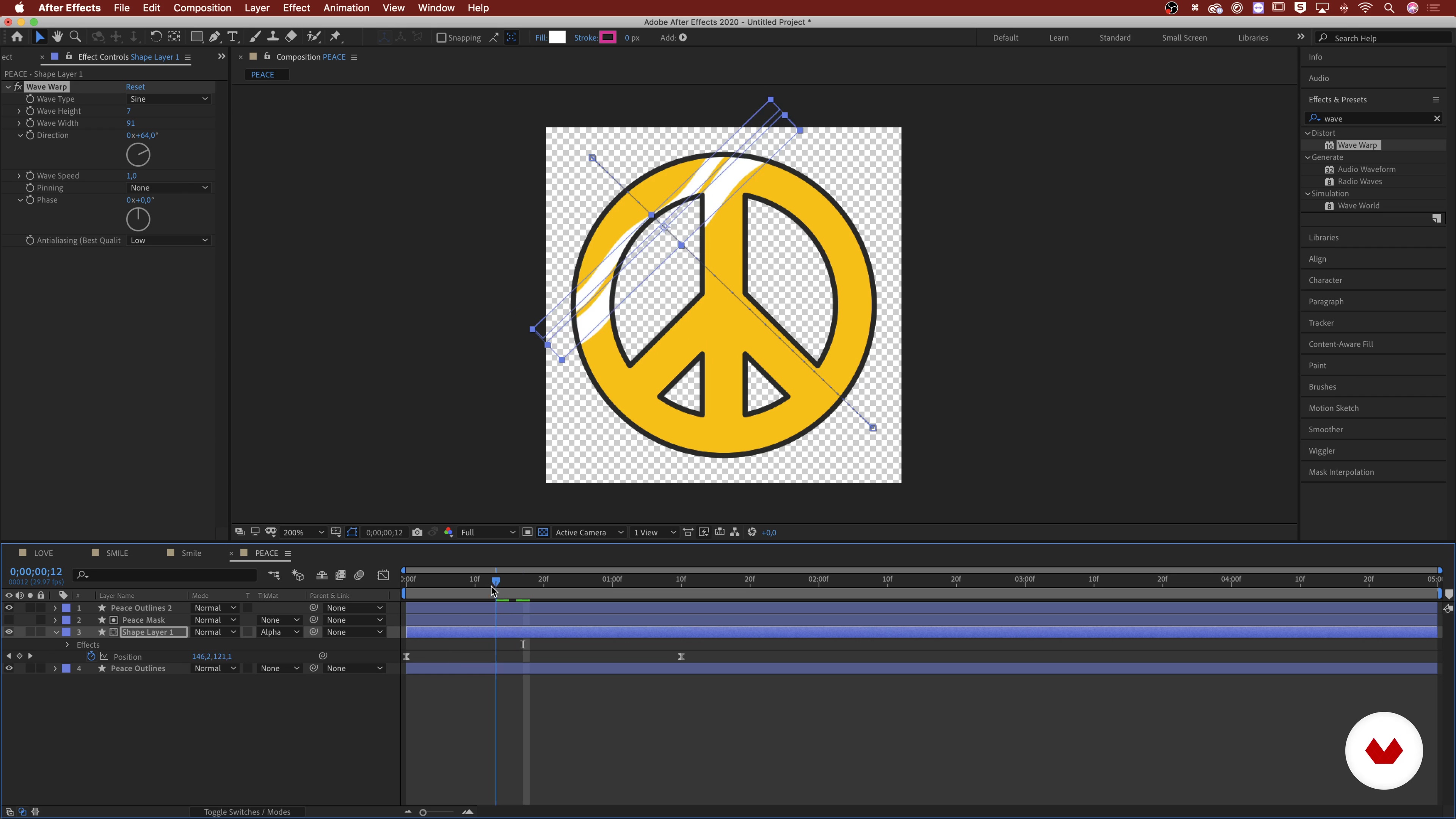
Working on After Effects 2
19 minutes, 30 seconds
What's included in this course?
Begin by getting to know Alex. He shares his journey that led him from the UK to become a designer and art director in Barcelona. He also shares the inspiration behind becoming an artist and the influences that have shaped his work.
A sticker is only as good as its concept. Learn what makes a good sticker by exploring themes, styles, and existing references. Before making your sticker set, learn some animation techniques to create GIFs in After Effects. Then, make some sketches to generate ideas and select your favorite ones.
Transfer your selected sketches to Illustrator using a scanner or a photo and turn them into illustrations. Using the Pen tool and shapes, learn how to create vector lines from your drawing. Then, transfer the vectors to After Effects and learn how to animate them. Next, see how to render your animations and create GIFs.
Once your GIFs are ready, it’s time to share them on social media. Set up a GIPHY account, upload your files, and start using them across different platforms. Learn Alex’s tips on how to give your motion graphics more visibility through the use of tags and keywords.
Recommended software & tools for this course
What is this course's project?
Create a GIF sticker pack for social media using hand-drawn sketches, Illustrator, and After Effects.

Projects by course students

Who is this online course for?
This course is for anyone with an interest in illustration, animation, or anyone that wants to learn how to create animated stickers for social media.
Requirements and materials
For this course, you will need a computer with Adobe Illustrator, After Effects, and Photoshop.
No previous knowledge is required.
Reviews
- 5 months ago
Clear, easy-to-understand explanation that’s perfect for beginners!
- 7 months ago
Informative and beginner friendly!!
- 11 months ago
Buen curso!
- 11 months ago
Bastante excelente para reforzar a detalle algo que me llamaba la atención
- 1 year ago
exceeelent👌!!!!!!!!

He has worked with brands like OFFF Book Illustration, Jump From Paper, Paperwallet, and Everpress. He has created graphics for clients like Adobe, HP, and UNIQLO. Currently, Alex is an Art Director at Vasava, a graphic design studio in Barcelona.
Content
- U1
Introduction
- About Me
- Influences
- What Will We Do in This Course?
- U2
Ideation
- Definition of Theme and Details
- Style Research and Existing References
- Techniques in After Effects for Creating GIFs
- Sketches
- U3
Digitisation and Animation
- Vectorization in Illustrator 1
- Vectorization in Illustrator 2
- Vectorization in Illustrator 3
- Importing Illustrator Files into After Effects
- Working on After Effects 1
- Working on After Effects 2
- Working on After Effects 3
- Rendering
- Preparing the GIF with Photoshop
- U4
Promotion
- Share on Social Media
- How to Use Stickers and Tips for Future Projects
- FP
Final project
- Motion Graphics for Social Media: Create A Sticker Pack
What to expect from a Domestika course
Learn at your own pace
Enjoy learning from home without a set schedule and with an easy-to-follow method. You set your own pace.
Learn from the best professionals
Learn valuable methods and techniques explained by top experts in the creative sector.
Meet expert teachers
Each expert teaches what they do best, with clear guidelines, true passion, and professional insight in every lesson.
Certificates
PLUSIf you're a Plus member, get a custom certificate signed by your teacher for every course. Share it on your portfolio, social media, or wherever you like.
Get front-row seats
Videos of the highest quality, so you don't miss a single detail. With unlimited access, you can watch them as many times as you need to perfect your technique.
Share knowledge and ideas
Ask questions, request feedback, or offer solutions. Share your learning experience with other students in the community who are as passionate about creativity as you are.
Connect with a global creative community
The community is home to millions of people from around the world who are curious and passionate about exploring and expressing their creativity.
Watch professionally produced courses
Domestika curates its teacher roster and produces every course in-house to ensure a high-quality online learning experience.
FAQs
Yes, this course is designed for beginners with step-by-step guidance on digital illustration, vector design, and animation techniques for creating sticker packs and animated visuals.
You will need Adobe Illustrator, Adobe After Effects, and Adobe Photoshop to complete the practical projects and follow along with the tutorials in this course.
You will learn how to design, illustrate, and animate digital stickers, create moodboards, research styles, build vector illustrations, and export animated GIFs for social media platforms like Giphy and Instagram.
The course covers the entire process: developing themes, designing stickers in Illustrator, animating them in After Effects, exporting as GIFs, and uploading to Giphy or Instagram.
No prior drawing experience is required. The course teaches both traditional sketching and digital illustration techniques, making it accessible for all skill levels.
Yes, you will learn strategies for audience targeting, trend research, effective keyword tagging, and timing to enhance sticker discoverability and engagement online.
Topics include composition, set design, playful material experimentation, moodboard creation, vector illustration in Illustrator, keyframing and animation in After Effects, exporting GIFs, and social media sticker strategies.