Dynamic Vector Illustration: Keys to Color and Composition
A course by Pietari Posti / Studio Posti , Illustrator

Joined April 2020


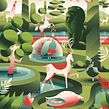

Learn how to create impactful vector illustrations with balanced compositions and limited colors in Adobe Illustrator
Joined April 2020

Even the most eye-catching illustrations are built on the basics of design. By learning how contrast and color work together, you can use minimal tools to create bold visual worlds that stimulate the imagination and connect with viewers.
By balancing multiple shapes and limited colors, Pietari Posti has developed a unique aesthetic which has led him to work with companies like Apple, Starbucks, and Nespresso, as well as publications like Monocle, The Guardian, and The New York Times.
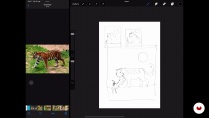
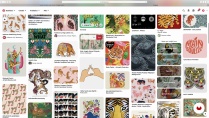
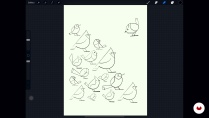
In this course, Pietari shows you that beautiful design doesn't have to be complex. By focusing on composition and color basics, he shows you how to train your creative eye and create lively vector illustrations from sketch to final product.
What will you learn in this online course?
22 lessons & 21 downloads

- 100% positive reviews (312)
- 5,076 students
- 22 lessons (4h 35m)
- 21 additional resources (8 files)
- Online and at your own pace
- Available on the app
- Audio: English, Spanish, French, Italian, Portuguese, Turkish
- Spanish · English · Portuguese · German · French · Italian · Polish · Dutch · Turkish · Romanian · Indonesian
- Level: Beginner
- Unlimited access forever
Recommended software & tools for this course
 Adobe Illustrator
What is this course's project?
Using essential design principles, create a dynamic vector illustration with limited elements and colors.

Projects by course students


Who is this online course for?
This course is for beginners who are interested in illustration or professional illustrators who would like to expand their understanding of how composition and color work together in design.
Requirements and materials
To participate in this course, you’ll need to sketch. This can be done with a pencil and paper or digitally with an iPad or a graphics tablet. For the final illustration, you’ll need a computer with Adobe Illustrator.
Basic drawing skills are nice to have but are not necessary.

Reviews

Pietari Posti / Studio Posti
A course by Pietari Posti / Studio Posti
Pietari Posti is a Finnish-born illustrator based in Barcelona. After studying graphic design in Finland, he founded Studio Posti, a creative studio specializing in design and illustration.
Recognized for his use of bold shapes, sharp contrast, and expressive style, Pietari’s work in advertising, editorials, and publishing has attracted a diverse range of clients including Apple, Nespresso, Random House, Starbucks, Monocle, The New York Times, The Guardian, and more.
In 2013, Pietari won the Victor & Albert Museum Best Book Cover Illustration Award for Arthur Ransome’s Swallows & Amazons.
Content
-
U1
Introduction
-
About Me
-
Influences
-
What We Will Do in the Course?
-
-
U2
Training Your Eye
-
Finding References 1
-
Finding References 2
-
The Basics of Composition
-
The Basics of Color
-
Sketching
-
Choosing and Refining Final Sketch 1
-
Choosing and Refining Final Sketch 2
-
-
U3
Let’s Draw Vectors
-
Drawing the Basic Elements 1
-
Drawing the Basic Elements 2
-
Drawing the Basic Elements 3
-
Drawing the Basic Elements 4
-
Drawing the Basic Elements 5
-
Applying Color
-
Applying Gradients, Shadows, and Highlights 1
-
Applying Gradients, Shadows, and Highlights 2
-
Refining and Cleaning up Your Illustration 1
-
Refining and Cleaning up Your Illustration 2
-
-
U4
Optional Finishing Touches and Exporting Your Work
-
Adding Textures and Analogue Feel to Your Vector Illustration
-
Exporting Illustration - for Digital Use and Print Use
-
-
FP
Final project
-
Dynamic Vector Illustration: Color and Composition
-
What to expect from a Domestika course
-
Learn at your own pace
Enjoy learning from home without a set schedule and with an easy-to-follow method. You set your own pace.
-
Learn from the best professionals
Learn valuable methods and techniques explained by top experts in the creative sector.
-
Meet expert teachers
Each expert teaches what they do best, with clear guidelines, true passion, and professional insight in every lesson.
-
Certificates
PlusIf you're a Plus member, get a custom certificate signed by your teacher for every course. Share it on your portfolio, social media, or wherever you like.
-
Get front-row seats
Videos of the highest quality, so you don't miss a single detail. With unlimited access, you can watch them as many times as you need to perfect your technique.
-
Share knowledge and ideas
Ask questions, request feedback, or offer solutions. Share your learning experience with other students in the community who are as passionate about creativity as you are.
-
Connect with a global creative community
The community is home to millions of people from around the world who are curious and passionate about exploring and expressing their creativity.
-
Watch professionally produced courses
Domestika curates its teacher roster and produces every course in-house to ensure a high-quality online learning experience.
FAQs
Domestika courses are online classes that allow you to learn new skills and create incredible projects. All our courses include the opportunity to share your work with other students and/or teachers, creating an active learning community. We offer different formats:
Original Courses: Complete classes that combine videos, texts, and educational materials to complete a specific project from start to finish.
Basics Courses: Specialized training where you master specific software tools step by step.
Specialization Courses: Learning paths with various expert teachers on the same topic, perfect for becoming a specialist by learning from different approaches.
Guided Courses: Practical experiences ideal for directly acquiring specific skills.
Intensive Courses (Deep Dives): New creative processes based on artificial intelligence tools in an accessible format for in-depth and dynamic understanding.
All courses are 100% online, so once they're published, courses start and finish whenever you want. You set the pace of the class. You can go back to review what interests you most and skip what you already know, ask questions, answer questions, share your projects, and more.
The courses are divided into different units. Each one includes lessons, informational text, tasks, and practice exercises to help you carry out your project step by step, with additional complementary resources and downloads. You'll also have access to an exclusive forum where you can interact with the teacher and with other students, as well as share your work and your course project, creating a community around the course.
You can redeem the course you received by accessing the redeeming page and entering your gift code.
 Adobe Illustrator
This course has been really good, I was looking for something to start my journey in vector illustration and this was perfect.
Es muy bueno el proceso completo de su trabajo. Recomiendo!
cool moite
Es un buen curso para empezar y te da consejos para exportar un proyecto con resultados profesionales. Me gusta que se enfoca en crear con pocos elementos en la ilustración para poner el máximo detalle en cada uno y no arriesgar su calidad, ni distorsionar su enfoque. Muy bien explicado aunque a veces el ritmo es un poco lento.
good course