Black and White Photography: Digital Editing and Retouching
A course by Cristian Maturana Ortiz , Visual artist

Joined June 2019

Achieve total control over the tonal range and learn how to capture, retouch, and print your photos
Joined June 2019

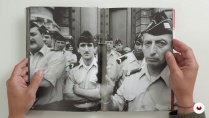
Visual artist Cristian Maturana makes an interesting reflection regarding black and white photography as he says that "when we talk about black and white we suppress color and work only with the form, we leave out half of the information of a whole. It seems like a radical choice that forces us to rethink the image... We observe reality in color and then we eliminate it. It’s a brutally self-aware decision."
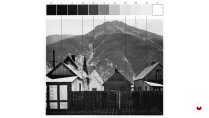
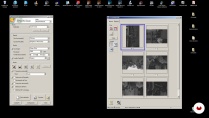
In this course, Maturana will introduce you to the exciting world of black and white, then will go further into a slightly more technical aspect of the course: the development and retouching of your photographs. He’ll teach you how to control your camera’s tonal range, both in the capture and in the editing, and to manage the values in the development and postproduction software, until you reach the printed output, configuring the mid-range peripherals for optimized use in photography.
What will you learn in this online course?
14 lessons & 18 downloads
- 95% positive reviews (107)
- 3,177 students
- 14 lessons (2h 29m)
- 18 additional resources (8 files)
- Online and at your own pace
- Available on the app
- Audio: Spanish
- Spanish · English · Portuguese · German · French · Italian · Polish · Dutch
- Level: Beginner
- Unlimited access forever
Recommended software for this course
 Adobe Lightroom
 Adobe Photoshop
What is this course's project?
You'll work on a photograph taken with a digital camera, going through all its postproduction in black and white, until it is printed. In addition, you'll learn to digitize or scan an analog photograph.

Projects by course students


Who is this online course for?
To amateur photographers and anyone who is interested in digital photography and wants to learn the keys to developing and retouching in black and white.
Requirements and materials
You'll only need to know how to use a camera. As for materials, you'll need a camera, a gray card, a computer with Adobe Photoshop and Adobe Photoshop Lightroom installed, a scanner, a low-end printer, and inkjet photo papers.

Reviews

Cristian Maturana Ortiz
A course by Cristian Maturana Ortiz
Chilean photographer and artist Cristian Maturana lives in Viña del Mar, where he teaches Professional Photography at the Instituto Arcos. He is also a printer and framing artist in the specialized workshop of fine art photography Taller Atacama. In addition to photography, he studied architecture and cinema.
He has received the Fondart award for the C.M./C.M project. (Yo es Otro), has published 2 books, and has participated in several individual and collective exhibits in important galleries and museums in Chile, Mexico, Colombia, and Spain.
Content
-
U1
Introduction
-
Presentation
-
Influences
-
What will we do in the course?
-
-
U2
Capture and settings
-
The world in black and white
-
Capture and display
-
Reading and interpretation of the histogram
-
Scanning
-
-
U3
Development and digital edition
-
Basic adjustments and selective corrections
-
Color to black and white conversion
-
Nonlinear editing with digital photography
-
Nonlinear editing with analog photography
-
-
U4
Final settings and printing
-
Printer Tonal Limits
-
The middle gray in the printer
-
Final settings and printing
-
-
FP
Final project
-
Black and white photography: development and digital retouching
-
What to expect from a Domestika course
-
Learn at your own pace
Enjoy learning from home without a set schedule and with an easy-to-follow method. You set your own pace.
-
Learn from the best professionals
Learn valuable methods and techniques explained by top experts in the creative sector.
-
Meet expert teachers
Each expert teaches what they do best, with clear guidelines, true passion, and professional insight in every lesson.
-
Certificates
PlusIf you're a Plus member, get a custom certificate signed by your teacher for every course. Share it on your portfolio, social media, or wherever you like.
-
Get front-row seats
Videos of the highest quality, so you don't miss a single detail. With unlimited access, you can watch them as many times as you need to perfect your technique.
-
Share knowledge and ideas
Ask questions, request feedback, or offer solutions. Share your learning experience with other students in the community who are as passionate about creativity as you are.
-
Connect with a global creative community
The community is home to millions of people from around the world who are curious and passionate about exploring and expressing their creativity.
-
Watch professionally produced courses
Domestika curates its teacher roster and produces every course in-house to ensure a high-quality online learning experience.
FAQs
Domestika's courses are online classes that provide you with the tools and skills you need to complete a specific project. Every step of the project combines video lessons with complementary instructional material, so you can learn by doing. Domestika's courses also allow you to share your own projects with the teacher and with other students, creating a dynamic course community.
All courses are 100% online, so once they're published, courses start and finish whenever you want. You set the pace of the class. You can go back to review what interests you most and skip what you already know, ask questions, answer questions, share your projects, and more.
The courses are divided into different units. Each one includes lessons, informational text, tasks, and practice exercises to help you carry out your project step by step, with additional complementary resources and downloads. You'll also have access to an exclusive forum where you can interact with the teacher and with other students, as well as share your work and your course project, creating a community around the course.
You can redeem the course you received by accessing the redeeming page and entering your gift code.
 Adobe Lightroom
 Adobe Photoshop
daad1995
muito bom
View translation
Hide translation
andresw75
Buen curso, muy claro, buenas explicaciones.
View translation
Hide translation
eduancast
Excelente. Explicaciones muy claras, buen material adicional, y te permite evolucionar de un nivel técnico básico a de un nivel técnico medio-alto
View translation
Hide translation
aquilespreto
Um bom curso, recomendo.
View translation
Hide translation
elvio_pierattini
Finalmente un corso ben fatto. Complimenti
View translation
Hide translation