Vector Illustration for Stationery
A course by Camipepe , Illustrators and graphic designers

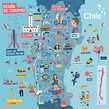


Learn how to express your personal universe in your first illustrated stationery collection

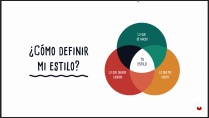
Getting an identity of your own is very important, especially in the world of painting and illustration. Having a defined personal style that speaks of oneself as an artist, although later used for other clients, is essential. Camipepe, or what is the same, Camila Olivares (Cami) and José Flores (Pepe), are designers who began self-taught in the illustration and, naturally, found their form of expression in a style that is fresh, colored Vivid and simple shapes, with a childish touch.
In this course, Camipepe will teach you how to capture your illustrated universe in a composition, and then take it to different stationery stands through a mockup . You will learn to prepare the files for printing and you will receive some tips to market your products and open your own path in the illustration.
What will you learn in this online course?
15 lessons & 29 downloads


- 100% positive reviews (77)
- 1,167 students
- 15 lessons (2h 4m)
- 29 additional resources (16 files)
- Online and at your own pace
- Available on the app
- Audio: Spanish
- Spanish · English · Portuguese · German · French · Italian · Polish · Dutch · Turkish · Romanian · Indonesian
- Level: Beginner
- Unlimited access forever
Recommended software & tools for this course
 Adobe Illustrator
What is this course's project?
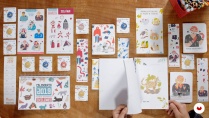
You will develop a line of stationery products, based on a vector illustration composed of several elements and you will learn how to create the final files of each support to be sent to the press.

Projects by course students


Who is this online course for?
This course is aimed at all people interested in illustration and stationery in general, who wish to start participating in fairs and illustration festivals, or who want to apply their illustrations to new media.
Requirements and materials
It is required to have basic knowledge of Adobe Illustrator, as well as basic fundamentals of illustration.
As for materials, you must have a computer, a scanner (or digital camera) and a graphics tablet or mouse . For analog exercises you will need a graphite pencil, a rubber and sheets of paper. Optionally, you can also use colored pencils and markers.

Reviews

Camipepe
A course by Camipepe
Camipepe is composed of Camila Olivares (Cami) and José Flores (Pepe). These independent illustrators live in the city of La Serena, Chile. They have been working together for 4 years, since they left the graphic design career, where they met.
They began to illustrate in a self-taught way for fun and they liked it so much that they started making a living from it, working as a freelance . His style is fresh, brightly colored, simple shapes and with a childish touch. They move like fish in water in the digital environment, since it is very versatile, although they have also dabbled in painting and muralism.
Content
-
U1
Introduction
-
Presentation
-
Influences
-
What will we do in this course?
-
-
U2
First steps
-
Our universe
-
Releasing hand
-
Let's find the theme together
-
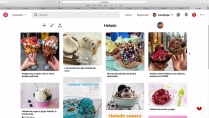
Looking for references
-
-
U3
From paper to screen
-
Shaping ideas
-
Scanning tips
-
Vectorization and details
-
Color palettes and application
-
Composition
-
-
U4
the best for the end
-
Presentation of mockups
-
Prepare your collection for printing
-
Show your products to the world
-
-
FP
Final project
-
Vector illustration applied to stationery
-
What to expect from a Domestika course
-
Learn at your own pace
Enjoy learning from home without a set schedule and with an easy-to-follow method. You set your own pace.
-
Learn from the best professionals
Learn valuable methods and techniques explained by top experts in the creative sector.
-
Meet expert teachers
Each expert teaches what they do best, with clear guidelines, true passion, and professional insight in every lesson.
-
Certificates
PlusIf you're a Plus member, get a custom certificate signed by your teacher for every course. Share it on your portfolio, social media, or wherever you like.
-
Get front-row seats
Videos of the highest quality, so you don't miss a single detail. With unlimited access, you can watch them as many times as you need to perfect your technique.
-
Share knowledge and ideas
Ask questions, request feedback, or offer solutions. Share your learning experience with other students in the community who are as passionate about creativity as you are.
-
Connect with a global creative community
The community is home to millions of people from around the world who are curious and passionate about exploring and expressing their creativity.
-
Watch professionally produced courses
Domestika curates its teacher roster and produces every course in-house to ensure a high-quality online learning experience.
FAQs
Domestika courses are online classes that allow you to learn new skills and create incredible projects. All our courses include the opportunity to share your work with other students and/or teachers, creating an active learning community. We offer different formats:
Original Courses: Complete classes that combine videos, texts, and educational materials to complete a specific project from start to finish.
Basics Courses: Specialized training where you master specific software tools step by step.
Specialization Courses: Learning paths with various expert teachers on the same topic, perfect for becoming a specialist by learning from different approaches.
Guided Courses: Practical experiences ideal for directly acquiring specific skills.
Intensive Courses (Deep Dives): New creative processes based on artificial intelligence tools in an accessible format for in-depth and dynamic understanding.
All courses are 100% online, so once they're published, courses start and finish whenever you want. You set the pace of the class. You can go back to review what interests you most and skip what you already know, ask questions, answer questions, share your projects, and more.
The courses are divided into different units. Each one includes lessons, informational text, tasks, and practice exercises to help you carry out your project step by step, with additional complementary resources and downloads. You'll also have access to an exclusive forum where you can interact with the teacher and with other students, as well as share your work and your course project, creating a community around the course.
You can redeem the course you received by accessing the redeeming page and entering your gift code.
 Adobe Illustrator
Aún estoy por terminar el curso pero me está gustando mucho! Me parecen muy cercanos en su forma de explicar (y muy amables!!), han logrado una forma entretenida y práctica de involucrarnos al curso y dan muchos consejos prácticos para lograr obtener nuestros propios productos de papelería. En mi caso han servido mucho de inspiración e impulso! ¡Gracias! :)
Es un poco básico, pero bonito e inspirador. Esperaba un poco más, aún así me gustó.
Me ha gustado mucho. Si bien se deben tener algunas nociones de los aplicativos, las formas de explicar son muy claras y las estrategias creativas para llegar al concepto a ilustrar son muy buenas. Estoy a punto de finalizarlo y me encanta que con una poca inversión pude obtener el conocimiento para realizar mucho de los proyectos que tenía en stand by. Gracias.
Un excelente curso, muy inspirador y completo.
su trabajo es precioso e inspriados! buen curso.