Guided Course: Typographic with personalized source and color
A guided course by Carlos Mignot , Graphics and Typography Designer

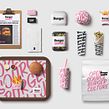

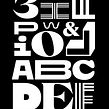

Create unique typographic ideas, learn to vectorize logos and choose sources of support for visual identity
Discover how to transform brand strategies into logos filled with soul and personality. Learn how to sketch typographic ideas that capture the essence of a fictional brand, but with a real market scenario. Explore techniques for translating abstract concepts into vibrant and unique visual forms, creating a visual identity that resonates with your target audience. Through practical exercises, develop skills to sketch typography that speaks for itself, expressing values and emotions authentically.
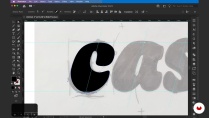
Dive deeper into refining your sketches, experimenting with variations that enhance your desired message. Discover the power of vectorization by transforming your creations into versatile, professional logos using Illustrator. Learn how to choose complementary fonts that solidify your project’s visual identity. Gain the confidence to create typographic designs that not only stand out, but also effectively communicate the essence of a brand.
What will you learn in this online course?
7 lessons & 15 downloads

- 100% positive reviews (1)
- 180 students
- 7 lessons (1h 17m)
- 15 additional resources (3 files)
- Online and at your own pace
- Available on the app
- Audio: Portuguese, Spanish
- Spanish · English · Portuguese · German · French · Italian · Polish · Dutch · Turkish · Romanian · Indonesian
- Level: Beginner
- Unlimited access forever
Recommended software & tools for this course
 Adobe Illustrator
 Adobe Photoshop
What is this course's project?
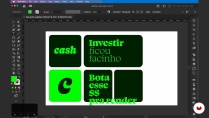
Students will develop typographic ideas from sketches, translating brand strategies into striking logos. They will learn how to vectorize the logo in Illustrator and choose supporting fonts, creating a cohesive and impactful visual identity for a fictional brand.
Who is this online course for?
Graphic designers, design students, and typography enthusiasts looking to hone their skills in creating memorable logos and exploring sketching and vectorization techniques will find value in this project, which also covers typographic pairing for cohesive visual identity.
Requirements and materials
No prior knowledge is required, but basic familiarity with design and typography is recommended. You will need paper and pencil for sketching, as well as a computer with Adobe Illustrator installed to vectorize and refine your typographic ideas.
Reviews

Carlos Mignot
A guided course by Domestika
Content
-
Guided Course: Typographic with personalized source and color
-
Podcast: The Power of Typography to Shape Meaning
-
Basic Brand Strategy
-
Sketching Typographic Ideas
-
Refining the Draft
-
Logo Vectorization
-
Typographic Pairing
-
Toolkit Assembly
-
Final project
-
What to expect from a Domestika course
-
Learn at your own pace
Enjoy learning from home without a set schedule and with an easy-to-follow method. You set your own pace.
-
Learn from the best professionals
Learn valuable methods and techniques explained by top experts in the creative sector.
-
Meet expert teachers
Each expert teaches what they do best, with clear guidelines, true passion, and professional insight in every lesson.
-
Certificates
PlusIf you're a Plus member, get a custom certificate signed by your teacher for every course. Share it on your portfolio, social media, or wherever you like.
-
Get front-row seats
Videos of the highest quality, so you don't miss a single detail. With unlimited access, you can watch them as many times as you need to perfect your technique.
-
Share knowledge and ideas
Ask questions, request feedback, or offer solutions. Share your learning experience with other students in the community who are as passionate about creativity as you are.
-
Connect with a global creative community
The community is home to millions of people from around the world who are curious and passionate about exploring and expressing their creativity.
-
Watch professionally produced courses
Domestika curates its teacher roster and produces every course in-house to ensure a high-quality online learning experience.
FAQs
Domestika courses are online classes that allow you to learn new skills and create incredible projects. All our courses include the opportunity to share your work with other students and/or teachers, creating an active learning community. We offer different formats:
Original Courses: Complete classes that combine videos, texts, and educational materials to complete a specific project from start to finish.
Basics Courses: Specialized training where you master specific software tools step by step.
Specialization Courses: Learning paths with various expert teachers on the same topic, perfect for becoming a specialist by learning from different approaches.
Guided Courses: Practical experiences ideal for directly acquiring specific skills.
Intensive Courses (Deep Dives): New creative processes based on artificial intelligence tools in an accessible format for in-depth and dynamic understanding.
All guided courses are 100% online, so once they're published, guided courses start and finish whenever you want. You set the pace of the class. You can go back to review what interests you most and skip what you already know, ask questions, answer questions, share your projects, and more.
The guided courses are divided into different modules. Each one includes lessons, informational text, tasks, and practice exercises to help you carry out your project step by step, with additional complementary resources and downloads. You'll also have access to an exclusive forum where you can interact with other students, as well as share your work and your final project, creating a community around the guided courses.
You can redeem the guided courses you received by accessing the redeeming page and entering your gift code.
 Adobe Illustrator
 Adobe Photoshop
O curso “Projeto guiado: Tipográfico com Fonte Personalizada e Cor” do Carlos Mignot mostra de forma prática como transformar esboços em logos vetorizados e escolher fontes que reforçam a identidade visual. Conteúdo direto e aplicável, ideal para designers e entusiastas de tipografia.
Recomendado para todos que querem criar marcas com personalidade.