Guided Course: Bring Your Sketch to Life with Lighting and Color in Photoshop
Course final project
A guided course by Joel Santana

Joined April 2002

Joined September 2019

About the final project for: Guided Course: Bring Your Sketch to Life with Lighting and Color in Photoshop
Transform Your Sketch into a Vibrant Digital Painting
“You can start this project with a sketch of your own—a character you’ve already drawn or a new concept you'd like to develop. As you bring your artwork into Photoshop, you'll learn how to refine your lines, add color, and enhance depth with lighting techniques. But don’t stop there! Once you've completed your first digital painting, challenge yourself with new variations and creative exercises. Here are five additional project ideas to push your skills further: Bring Your Character to Life: From Sketch to Stunning Digital Painting In this project, you will take your sketch to the next level by applying color, lighting, and depth in Photoshop to transform it into a vibrant digital illustration. You'll learn how to properly import your drawing, establish an effective color base, and experiment with light and shadow to bring your character to life. The challenge is not just to add color but to explore different lighting setups to convey emotions and tell a visual story. Example project: Take a character sketch and paint it in Photoshop using dramatic lighting to enhance its personality (e.g., sunset glow, neon lights, candlelight, etc.). Color Exploration: Create Unique Variations of Your Character In this exercise, you'll focus on color theory to explore different color schemes for the same character. By using layers and blending modes in Photoshop, you'll experiment with vibrant tones, unexpected contrasts, and harmonious palettes to strengthen your design. Example project: Choose a sketch and create three different versions with contrasting color palettes (e.g., one warm, one cool, and one monochrome). Light and Shadow Effects: Paint an Atmospheric Scene In this challenge, you'll work with light sources to add drama and realism to your character. You'll learn how to apply reflections, shadows, and lighting effects in Photoshop, exploring how light shapes forms and textures. Example project: Paint a character in a nighttime scene illuminated only by a flashlight or a window, experimenting with how the light affects the composition. Stylize Your Character: From Sketch to Expressive Illustration Here, you'll experiment with different digital painting styles to find the one that best suits your creative vision. From smooth, realistic finishes to expressive, painterly strokes, you'll explore various approaches to make your illustration unique. Example project: Take a sketch and paint it in two different styles (e.g., semi-realistic vs. cel shading) to compare how the perception of the character changes. Expression and Emotion: Capture Personality in Your Illustration Color and lighting can completely change the atmosphere of an image. In this project, you'll focus on conveying emotions through digital painting, adjusting shadows, contrast, and colors to evoke feelings in the viewer. Example project: Paint two versions of the same character with different emotions, using lighting and color to emphasize each mood (e.g., happiness with warm tones and sadness with cool tones). Each of these projects builds on your digital painting skills and encourages creative exploration. Start with your initial character sketch and keep pushing your artistic boundaries with these challenges!
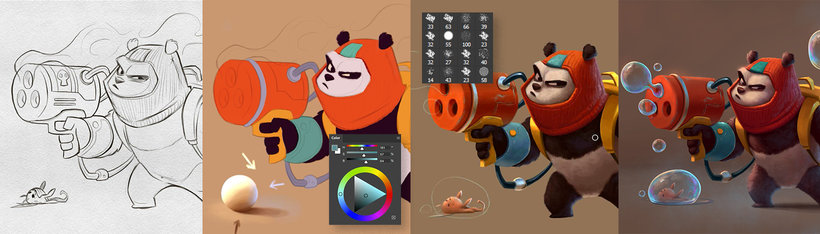
Course summary for: Guided Course: Bring Your Sketch to Life with Lighting and Color in Photoshop
-
Category
Illustration -
Software
Adobe Photoshop -
Areas
Digital Design, Digital Painting, Sketching

Joel Santana
A guided course by Domestika
- 100% positive reviews (9)
- 335 students
- 10 lessons (1h 29m)
- 7 additional resources (2 files)
- Online and at your own pace
- Available on the app
- Audio: English, Spanish
- Spanish · English · Portuguese · German · French · Italian · Polish · Dutch · Turkish · Romanian · Indonesian
- Level: Beginner
- Unlimited access forever
Recommended software & tools for this course
 Adobe Photoshop
Category
Areas

