Introduction to Motion Design and Animation Curves in After Effects
A course by Holke 79 , Graphic Designer

Joined June 2015

Learn to create sleek motion systems to give your animations personality and intent

Adding motion to graphic design opens a whole new layer of expression for any creator, but it also presents another layer of difficulty. To make this a smooth transition, veteran motion designer Borja Holke, who has worked with major clients like Canal+ and Converse, teaches you the secrets to timing and animation curves in Adobe After Effects.
In this online course, learn how to use the professional animation tools in After Effects from scratch and master the art of motion.
What will you learn in this online course?
23 lessons & 12 downloads
- 98% positive reviews (351)
- 11,869 students
- 23 lessons (3h 35m)
- 12 additional resources (1 files)
- Online and at your own pace
- Available on the app
- Audio: Spanish, English, French, Italian, Portuguese
- Spanish · English · Portuguese · German · French · Italian · Polish · Dutch
- Level: Beginner
- Unlimited access forever
Recommended software for this course
 Adobe After Effects
What is this course's project?
Create a series of 12 animations ready to post on Instagram and a short reel for your portfolio.

Projects by course students


Who is this online course for?
Graphic designers who want to learn to use motion as another layer of expression in their projects.
Requirements and materials
You don't need any previous experience with Adobe After Effects, just a computer with the software installed and an interest in graphic and motion design.

New to Adobe After Effects? In that case, we recommend taking Domestika Basics courses to learn how to use the software: Introduction to After Effects.
Reviews

Holke 79
A course by Holke 79
Borja is a graphic designer specialized in motion graphics from San Sebastián, Spain. He studied journalism at the University of San Pablo in Madrid, but he soon discovered that his passion was in graphic design. After taking courses in design and animation, he began to work as a broadcast designer for TV networks like Canal+, creating motion graphics for sports matches like El Clásico (Real Madrid versus FC Barcelona) and Copa América.
He worked as a senior motion designer for Saffron Brand Consultants in Madrid, where he helped brands build their visual identity through animation. In 2019, after over a decade of working in motion design, Borja started his own motion graphic design company, Holke 79. Some of his projects include online campaigns for Converse, Aerosmith’s Last Vegas residency, an official lyrics video for Green Day, and a number of animated graphics for TV shows.
Content
-
U1
Welcome aboard!
-
Presentation
-
Influences
-
-
U2
Cheering in After Effects with style
-
What is Adobe After Effects?
-
Getting started in After Effects
-
Introduction Layers
-
Layers of shape or shape layers
-
Moving graphics 1. Our allies Keyframes
-
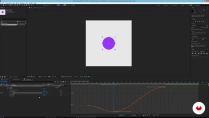
To move graphics 2. We go deep into the animation curves
-
Renders and formats
-
-
U3
Designing the movement
-
A bit of context
-
Our character-based methodology
-
A little design before animating
-
-
U4
Creating our basic library of movement
-
Scale animation
-
Position animation
-
Stretch position animation
-
Rotation Animation
-
Swipe or drag
-
-
U5
Next level: choreographic animations
-
Choreography 1
-
Choreography 2
-
Choreography 3
-
Choreography 4
-
-
U6
Tricks to make a good reel and devastate in Social Networks
-
Workflow and tips for the final mini reel
-
conclusion
-
-
FP
Final project
-
Motion graphics for social networks
-
What to expect from a Domestika course
-
Learn at your own pace
Enjoy learning from home without a set schedule and with an easy-to-follow method. You set your own pace.
-
Learn from the best professionals
Learn valuable methods and techniques explained by top experts in the creative sector.
-
Meet expert teachers
Each expert teaches what they do best, with clear guidelines, true passion, and professional insight in every lesson.
-
Certificates
PlusIf you're a Plus member, get a custom certificate signed by your teacher for every course. Share it on your portfolio, social media, or wherever you like.
-
Get front-row seats
Videos of the highest quality, so you don't miss a single detail. With unlimited access, you can watch them as many times as you need to perfect your technique.
-
Share knowledge and ideas
Ask questions, request feedback, or offer solutions. Share your learning experience with other students in the community who are as passionate about creativity as you are.
-
Connect with a global creative community
The community is home to millions of people from around the world who are curious and passionate about exploring and expressing their creativity.
-
Watch professionally produced courses
Domestika curates its teacher roster and produces every course in-house to ensure a high-quality online learning experience.
FAQs
Domestika's courses are online classes that provide you with the tools and skills you need to complete a specific project. Every step of the project combines video lessons with complementary instructional material, so you can learn by doing. Domestika's courses also allow you to share your own projects with the teacher and with other students, creating a dynamic course community.
All courses are 100% online, so once they're published, courses start and finish whenever you want. You set the pace of the class. You can go back to review what interests you most and skip what you already know, ask questions, answer questions, share your projects, and more.
The courses are divided into different units. Each one includes lessons, informational text, tasks, and practice exercises to help you carry out your project step by step, with additional complementary resources and downloads. You'll also have access to an exclusive forum where you can interact with the teacher and with other students, as well as share your work and your course project, creating a community around the course.
You can redeem the course you received by accessing the redeeming page and entering your gift code.
 Adobe After Effects
vmgonzalez
muy buen curse para empezar a aprender el programa. Basico pero muy muy completo, de aqui se puede dar seguimiento al aprendizaje.
View translation
Hide translation
giulianox64
Muy bien explicados los fundamentos básicos de After Effects. Me sirvió mucho en el futuro
View translation
Hide translation
girafish
A very good course for beginners.
ajithant88
Excellent Course.Great Teacher !
gastonmz
Las explicaciones y el contenido son muy llevaderos, sirven como base para proyectos mas complejos, en lo personal me ayudo a amigarme con el programa y entender la lógica del mismo.
View translation
Hide translation