Abstract Portrait Animation with Cinema 4D
A course by Jonas Pfeiffer , Motion Designer and 3D Artist



Unlock the secrets of creating captivating abstract portraits through animation in Cinema 4D.

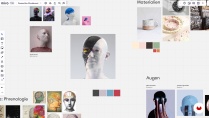
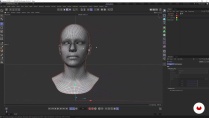
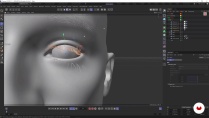
Meet Jonas Pfeiffer, the creative mind behind this captivating course. If you're ready to dive into the world of motion design and 3D art, you're in for a treat. In this online course, Jonas will take you on an artistic journey where you'll learn to breathe life into 3D portraits using Cinema 4D. Buckle up for a hands-on experience that will help you unleash your creativity.
Jonas is a seasoned motion Ddsigner and 3D artist based in Hamburg. With a strong foundation in various design domains, he found his true passion in the realm of motion and 3D. His belief in the power of video and 3D as mediums to evoke emotions and thoughts is the backbone of this course. As an artist who thrives on pushing boundaries, Jonas is here to share his expertise and insights on bringing depth and character to 3D portraits.
What will you learn in this online course?
24 lessons & 15 downloads
- 100% positive reviews (7)
- 502 students
- 24 lessons (5h 42m)
- 15 additional resources (1 files)
- Online and at your own pace
- Available on the app
- Audio: German
- German · Spanish · English · Portuguese · French · Italian · Polish · Dutch · Turkish · Romanian · Indonesian
- Level: Beginner
- Unlimited access forever
Recommended software & tools for this course
 Adobe After Effects
 Adobe Photoshop
 Cinema 4D
 OctaneRender
What is this course's project?
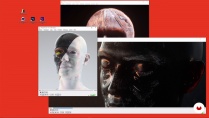
In this course, your creative journey culminates in a fascinating final project: crafting a 3D portrait that truly comes to life. Throughout the course, you'll learn the techniques, hone your skills, and receive guidance from Jonas Pfeiffer. With these newfound skills in your toolkit, you'll embark on creating a captivating 3D portrait that beautifully integrates subtle animations or textures you've designed yourself.
Who is this online course for?
Are you ready to take your passion for motion design and 3D art to the next level? If you're an aspiring artist, designer, or anyone eager to explore the world of 3D portrait animation, this course is tailored to you. Jonas Pfeiffer's guidance will equip you with the skills to create engaging animations that provoke emotions and thoughts, making it a perfect fit for those looking to infuse their creativity with technical expertise.
Requirements and materials
To make the most of this transformative learning journey, gather your drawing materials and get ready to explore the realm of 3D art and motion design. You'll need a mobile-phone camera and a basic grasp of Cinema 4D, OctaneRender, Photoshop, and After Effects. Jonas Pfeiffer's expertise will guide you through the process of creating thought-provoking animations that showcase your creative potential.
New to Adobe After Effects? In that case, we recommend taking Domestika Basics courses to learn how to use the software: Introduction to After Effects.
Reviews

Jonas Pfeiffer
A course by Jonas Pfeiffer
Meet Jonas Pfeiffer, a Hamburg-based motion designer and 3D artist. With a background in BA Mediendesign, Jonas has honed his skills in diverse design domains, ultimately finding his passion in motion and 3D. His unique perspective draws inspiration from the intricate diversity of the human mind, beautifully translating thoughts and emotions into visual narratives. Having collaborated with brands such as Samsung, Touchcast, CHRLX, and Lyteloop, Jonas's artistry and expertise will inspire you to create compelling animations that resonate with audiences.
Content
-
U1
introduction
-
About me
-
Inspirations
-
-
U2
Concept and modeling
-
Development of a visual concept
-
3D modeling: the head
-
3D modeling: the face
-
-
U3
animation
-
Rigs: Introduction
-
Apply rigs in portrait 1
-
Apply rigs in portrait 2
-
Animation of head and face 1
-
Animation of head and face 2
-
-
U4
Textures
-
Building the base texture 1
-
Building the base texture 2
-
Creation of analog elements 1
-
Creation of analog elements 2
-
Creation of analog elements 3
-
Shader setup in Cinema 4D 1
-
Shader setup in Cinema 4D 2
-
Shader setup in Cinema 4D 3
-
Shader setup in Cinema 4D 4
-
-
U5
The final steps
-
Final lighting and render settings
-
Setting up the final rendering
-
Post-processing in After Effects and export 1
-
Post-processing in After Effects and export 2
-
Tips for social media and NFT platforms
-
-
FP
Final project
-
Animation of abstract portraits in Cinema 4D
-
What to expect from a Domestika course
-
Learn at your own pace
Enjoy learning from home without a set schedule and with an easy-to-follow method. You set your own pace.
-
Learn from the best professionals
Learn valuable methods and techniques explained by top experts in the creative sector.
-
Meet expert teachers
Each expert teaches what they do best, with clear guidelines, true passion, and professional insight in every lesson.
-
Certificates
PlusIf you're a Plus member, get a custom certificate signed by your teacher for every course. Share it on your portfolio, social media, or wherever you like.
-
Get front-row seats
Videos of the highest quality, so you don't miss a single detail. With unlimited access, you can watch them as many times as you need to perfect your technique.
-
Share knowledge and ideas
Ask questions, request feedback, or offer solutions. Share your learning experience with other students in the community who are as passionate about creativity as you are.
-
Connect with a global creative community
The community is home to millions of people from around the world who are curious and passionate about exploring and expressing their creativity.
-
Watch professionally produced courses
Domestika curates its teacher roster and produces every course in-house to ensure a high-quality online learning experience.
FAQs
Domestika courses are online classes that allow you to learn new skills and create incredible projects. All our courses include the opportunity to share your work with other students and/or teachers, creating an active learning community. We offer different formats:
Original Courses: Complete classes that combine videos, texts, and educational materials to complete a specific project from start to finish.
Basics Courses: Specialized training where you master specific software tools step by step.
Specialization Courses: Learning paths with various expert teachers on the same topic, perfect for becoming a specialist by learning from different approaches.
Guided Courses: Practical experiences ideal for directly acquiring specific skills.
Intensive Courses (Deep Dives): New creative processes based on artificial intelligence tools in an accessible format for in-depth and dynamic understanding.
All courses are 100% online, so once they're published, courses start and finish whenever you want. You set the pace of the class. You can go back to review what interests you most and skip what you already know, ask questions, answer questions, share your projects, and more.
The courses are divided into different units. Each one includes lessons, informational text, tasks, and practice exercises to help you carry out your project step by step, with additional complementary resources and downloads. You'll also have access to an exclusive forum where you can interact with the teacher and with other students, as well as share your work and your course project, creating a community around the course.
You can redeem the course you received by accessing the redeeming page and entering your gift code.
 Adobe After Effects
 Adobe Photoshop
 Cinema 4D
 OctaneRender
Muy bueno
Sin duda un exelente curso
cool content, highly recommended!
Very good! I like it so much!
Very nice Kurs. Tnx u very much!!!