Batch Photo Editing in Lightroom Classic
A course by Ana Herrera (AHR Photos), Wedding Photography

Joined July 2021

Learn how to edit a large number of images using presets and retouching techniques for a cohesive end result
Joined July 2021

Imagine how much time you could save by editing your photos in batches. Learn alongside Ana Herrera, the professional wedding photographer behind AHR photos, who has devoted more than six years to telling stories and creating unforgettable memories through her images. Her work has been featured in industry publications like Rock My Wedding, Tendencias de Bodas, and Ruffled.
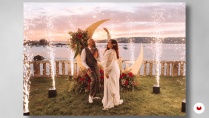
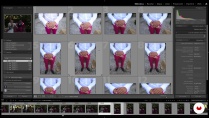
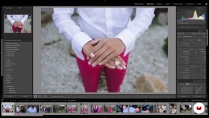
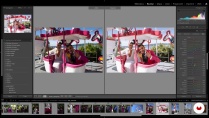
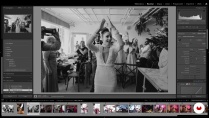
In this course, Ana teaches you to edit all your wedding photos from start to finish. Learn an efficient way to edit large batches of photos using presets and a range of techniques for a warm, natural, and uniform look in your photo albums.
What will you learn in this online course?
14 lessons & 15 downloads

- 100% positive reviews (47)
- 2,017 students
- 14 lessons (2h 8m)
- 15 additional resources (3 files)
- Online and at your own pace
- Available on the app
- Audio: Spanish, English, French, Indonesian, Italian, Portuguese, Romanian, Turkish
- Spanish · English · Portuguese · German · French · Italian · Polish · Dutch · Turkish · Indonesian · Romanian
- Level: Beginner
- Unlimited access forever
Recommended software & tools for this course
 Adobe Lightroom
What is this course's project?
Edit both color and black-and-white wedding photos using batch editing.

Projects by course students


Who is this online course for?
Anyone who wants to learn batch editing from scratch or build on their skills, whether for event photography or your own private images.
Requirements and materials
Ana Herrera is a professional photographer at AHR photos. She is from Seville and has spent the last several years dedicated to what most inspires her. She loves to tell stories and specializes in creating unforgettable memories by immortalizing each moment with an artistic touch that she achieves with acute attention to detail throughout the editing process.
Her work has been featured in industry publications like Rock My Wedding, [i]Tendencias de Bodas[]/i, and Ruffled.

Reviews

Ana Herrera (AHR Photos)
A course by Ana Herrera (AHR Photos)
Ana Herrera is a professional photographer at AHR photos. She is from Seville and has spent the last several years dedicated to what most inspires her. She loves to tell stories and specializes in creating unforgettable memories by immortalizing each moment with an artistic touch that she achieves with acute attention to detail throughout the editing process.
Her work has been featured in industry publications like Rock My Wedding, [i]Tendencias de Bodas[]/i, and Ruffled.
Content
-
U1
Introduction
-
Presentation
-
Influences
-
-
U2
Preparation of photographs
-
My team and course content
-
A good photo shot
-
Workflow and first selection
-
-
U3
Editing photos
-
Color Edition 1
-
Color Edition 2
-
Black and white editing
-
Batch Edition 1
-
Batch edit 2
-
Complementary tools
-
Review and export
-
-
U4
How to share your work
-
How to deliver your project to the client
-
Tips on the world of photography
-
-
FP
Final project
-
Batch Photo Editing in Lightroom Classic
-
What to expect from a Domestika course
-
Learn at your own pace
Enjoy learning from home without a set schedule and with an easy-to-follow method. You set your own pace.
-
Learn from the best professionals
Learn valuable methods and techniques explained by top experts in the creative sector.
-
Meet expert teachers
Each expert teaches what they do best, with clear guidelines, true passion, and professional insight in every lesson.
-
Certificates
PlusIf you're a Plus member, get a custom certificate signed by your teacher for every course. Share it on your portfolio, social media, or wherever you like.
-
Get front-row seats
Videos of the highest quality, so you don't miss a single detail. With unlimited access, you can watch them as many times as you need to perfect your technique.
-
Share knowledge and ideas
Ask questions, request feedback, or offer solutions. Share your learning experience with other students in the community who are as passionate about creativity as you are.
-
Connect with a global creative community
The community is home to millions of people from around the world who are curious and passionate about exploring and expressing their creativity.
-
Watch professionally produced courses
Domestika curates its teacher roster and produces every course in-house to ensure a high-quality online learning experience.
FAQs
You’ll master creative wedding photography techniques, using natural light and flash, natural and batch editing in Lightroom, efficient file organization, and developing your own photographic style to deliver professional projects to your clients.
Yes, the course is designed for those with basic photography knowledge who want to refine their wedding shooting and professional Lightroom editing skills.
Basic photography knowledge and initial Lightroom experience are recommended, as the course dives into intermediate techniques and advanced workflows.
It’s best to have a DSLR or mirrorless camera, fast lenses, an external flash, UV filters, and access to a computer with Lightroom Classic installed.
You’ll learn how to create, import, and organize custom presets, applying them efficiently to achieve consistent, natural edits in your wedding shoots.
Yes, the course covers batch editing to apply adjustments to large numbers of photos and sync settings, saving you editing time.
You’ll learn strategies to connect with couples and capture their genuine, natural moments, creating authentic and emotional photos.
 Adobe Lightroom
La experiencia y el profesionalismo se nota en cada clase.
Buenas técnicas para optimizar el flujo de trabajo!
es un buen curso para bodas
Me encanta! Aunque mis fotos son de producto, me ha dado nociones básicas para manejar Lightroom y la edición en lote, que agiliza mucho el proceso. También he aprendido de verle a ella editar...
Me encantó el curso. Excelente forma de enseñar, los presets y archivos son de gran valor. Es un must have si empiezas en la fotografía o quieres hacer tus tiempos de edición más eficientes.