Creation of Shots with VFX in Nuke
A course by Ramon Cervera , Composer and VFX Supervisor




Perfect the process to create computer-generated effects for cinema and TV

We witness acts of magic every day, both on the small and the big screen. The development of visual effects in shots for film and television has reached a point where we often find it difficult to distinguish reality from visual illusion. This is all thanks to VFX composers such as Ramón Cervera, who, in his more than 20 years of experience, has brought together almost 80 films and series with Telson studio, generating the illusion that all the imagery comes from the original filming.
In this online course, discover the entire in-depth process to make a VFX shot, from the original idea, the filming approach, and the shoot itself, to the post-production phase, more specifically, the composition with Nuke, where you put all the elements together, both filmed and digitally generated, for a VFX shot that could be used in a movie or series.
What will you learn in this online course?
16 lessons & 13 downloads

- 94% positive reviews (102)
- 2,858 students
- 16 lessons (2h 57m)
- 13 additional resources (6 files)
- Online and at your own pace
- Available on the app
- Audio: Spanish
- Spanish · English · Portuguese · German · French · Italian · Polish · Dutch · Turkish · Romanian · Indonesian
- Level: Intermediate
- Unlimited access forever
Recommended software & tools for this course
 Nuke
NukeWhat is this course's project?
Discover the workflow for an audiovisual production and the creation of a VFX shot, from its conception to its screening.

Projects by course students


Who is this online course for?
Creatives and lovers of film and television who are just starting out or want to delve further into the creation of computer generated effects and have a great interest in VFX processes.
Requirements and materials
Although Ramón explains how to use Nuke step by step, you need some notion of how to use its interface and be familiar with concepts such as alpha, keyframes, and color correction.
In terms of materials, you need a graphics tablet and a computer that meets the minimum Nuke requirements (indicated on the Foundry website, where you can also download the program).

Reviews

Ramon Cervera
A course by Ramon Cervera
Ramón Cervera studied audiovisual and entertainment production (1998) and, about a year later, joined Telson Servicios Audiovisuales, where he already has almost 20 years of professional experience. His career has been in constant crescendo, starting out as a VTR operator, to later becoming a Junior Flame Operator, and moving on to become Shake Digital Composer until reaching his current position of Nuke Digital Composer.
To date, he has participated in almost 80 films and series, many of them recognized for their effects with awards and nominations, alongside renowned Spanish film directors.
Content
-
U1
Introduction
-
Personal and work presentation
-
Influences
-
A little history
-
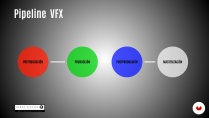
Pipeline
-
-
U2
Before postproduction
-
Preproduction
-
Filming
-
Analysis of the material and distribution of tasks
-
-
U3
Working the VFX
-
Preparing the material 1
-
Preparing the material 2
-
Change of marker
-
Replacing advertising
-
3D integration 1
-
3D integration 2
-
Rotoscopy
-
Inspiration ideas
-
-
U4
Rendering and delivery
-
Rendering and delivery
-
-
FP
Final project
-
Creating plans with VFX in Nuke
-
What to expect from a Domestika course
-
Learn at your own pace
Enjoy learning from home without a set schedule and with an easy-to-follow method. You set your own pace.
-
Learn from the best professionals
Learn valuable methods and techniques explained by top experts in the creative sector.
-
Meet expert teachers
Each expert teaches what they do best, with clear guidelines, true passion, and professional insight in every lesson.
-
Certificates
PlusIf you're a Plus member, get a custom certificate signed by your teacher for every course. Share it on your portfolio, social media, or wherever you like.
-
Get front-row seats
Videos of the highest quality, so you don't miss a single detail. With unlimited access, you can watch them as many times as you need to perfect your technique.
-
Share knowledge and ideas
Ask questions, request feedback, or offer solutions. Share your learning experience with other students in the community who are as passionate about creativity as you are.
-
Connect with a global creative community
The community is home to millions of people from around the world who are curious and passionate about exploring and expressing their creativity.
-
Watch professionally produced courses
Domestika curates its teacher roster and produces every course in-house to ensure a high-quality online learning experience.
FAQs
What are Domestika's online courses?
Domestika courses are online classes that allow you to learn new skills and create incredible projects. All our courses include the opportunity to share your work with other students and/or teachers, creating an active learning community. We offer different formats:
Original Courses: Complete classes that combine videos, texts, and educational materials to complete a specific project from start to finish.
Basics Courses: Specialized training where you master specific software tools step by step.
Specialization Courses: Learning paths with various expert teachers on the same topic, perfect for becoming a specialist by learning from different approaches.
Guided Courses: Practical experiences ideal for directly acquiring specific skills.
Intensive Courses (Deep Dives): New creative processes based on artificial intelligence tools in an accessible format for in-depth and dynamic understanding.
When do the courses start and when do they finish?
All courses are 100% online, so once they're published, courses start and finish whenever you want. You set the pace of the class. You can go back to review what interests you most and skip what you already know, ask questions, answer questions, share your projects, and more.
What do Domestika's courses include?
The courses are divided into different units. Each one includes lessons, informational text, tasks, and practice exercises to help you carry out your project step by step, with additional complementary resources and downloads. You'll also have access to an exclusive forum where you can interact with the teacher and with other students, as well as share your work and your course project, creating a community around the course.
Have you been given a course?
You can redeem the course you received by accessing the redeeming page and entering your gift code.
 Nuke
Nuke
muy desfasado, necesitaria una acuatizacion, version muy antigua de Nuke, falta material, no se puede seguir bien el curso sin el material, valoración 0/10
AWSOME
Se ha quedado muy desfasado, además los materiales para hacer el proyecto varían de los que usa el profesor y por tanto te encuentras con muchos problemas para poder seguir los pasos de los videos. No lo recomiendo
El curso está bien pero va a toda maquina y es muy facil perderte. No soy experto en Nuke, solo soy un generalista 3D, pero me cuesta mucho seguirle.
esto esta brutal, y mas con ese descuento, entrega mucho valor por tan bajo precio