Interior Design: Plan Creative Workspaces
A course by Monika Lepel , Interior Designer


Design inspiring workspaces by learning to analyze structures, needs, and goals as a starting point for an identity-focused concept

"Luckily, how we work is no longer the same". For Monika Lepel, interior designer and founder of LEPEL & LEPEL studio, a new way of working means new workspaces, and that's just her specialty: designing unconventional office spaces that meet the needs of today's smart, digital, and dynamic work climate. Her and her team have worked with pioneers of digitization like Google and Microsoft.
The foundation of her work is to help "form ties". She strongly believes that meticulous mapping out of shared spaces is the ideal methodology for uniting teams and departments to create internal brand identities alongside external ones. For her, interior design is an art form that almost everyone can get excited about.
In this course, learn to design extraordinary spaces and develop strong workspace concepts. Analyze both the physical and human requirements and make your ideas a reality selecting the materials and colors of the decor to impress your client with a clear and concise presentation.
What will you learn in this online course?
18 lessons & 23 downloads

- 100% positive reviews (31)
- 1,338 students
- 18 lessons (3h 27m)
- 23 additional resources (12 files)
- Online and at your own pace
- Available on the app
- Audio: German
- German · Spanish · English · Portuguese · French · Italian · Polish · Dutch · Turkish · Romanian · Indonesian
- Level: Beginner
- Unlimited access forever
What is this course's project?
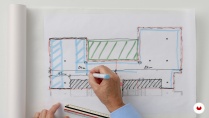
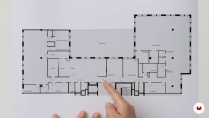
Develop the concept for the interior design of a workspace including floor plans, sketches, and a summary of the necessary materials. Compile all your reference materials for the design of a private space into one presentation in the form of a professional portfolio entry.

Who is this online course for?
Interior design students and industry professionals as well as anyone interested in the design of office spaces regardless of previous experience.
Requirements and materials
Basic knowledge of a 2D and 3D design software such as Vectorworks or SketchUp would be useful but is not essential.
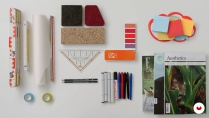
In terms of materials, you need tracing paper, a ruler, a few different pencils, and a device installed with Adobe Illustrator, Photoshop, PowerPoint, and InDesign.

Reviews

Monika Lepel
A course by Monika Lepel
Monika Lepel is an interior designer specialized in the design of workspaces. She has been managing the architecture and interior design studio LEPEL & LEPEL, based in Cologne, Germany, for over 25 years. It is there that her and her team bring inspiring interiors to life. With her designs, she aims to find a creative solution to the needs of large organizations and businesses as well as individuals. According to Monika, a space has an inspiring and positive atmosphere when it conveys and aesthetically externalizes a company's culture and identity. Designing spaces like these allows her to promote the formation of ties within a company and develop comprehensive design concepts that are wholly tailored to their users.
Her client list includes big names like Microsoft, Google, True Fruits, and UFA productions. Thanks to their hard work, she and her team have received the German Interior Design Award, the Red Dot Design Award, and the IF Award, and their designs were displayed as part of the exhibition Frau Architekt Seit mehr als 100 Jahren: Frauen im Architekturberuf, on the history of female architects in Germany and Greece. She has also formed part of several judges' panels and has written industry-specialized articles.
Content
-
U1
Introduction
-
About Me
-
Influences
-
-
U2
First Steps
-
Tools
-
What Is Interior Design?
-
Case Study: Google Office
-
Workspace: The Special Place
-
-
U3
Analytical Topics
-
Spatial Structure 1
-
Spatial Structure 2
-
Customer - Brand - Identity
-
Room Types 1
-
Room Types 2
-
-
U4
Design Themes
-
Idea and Mood Board
-
Materials and Colors
-
Floor Plan and Concept Idea
-
Representation
-
The Presentation of the Project
-
-
U5
Further Ideas
-
Project Completion and Insights
-
Build Relationships
-
-
FP
Final project
-
Interior Design Fundamentals: Plan Creative Workspaces
-
What to expect from a Domestika course
-
Learn at your own pace
Enjoy learning from home without a set schedule and with an easy-to-follow method. You set your own pace.
-
Learn from the best professionals
Learn valuable methods and techniques explained by top experts in the creative sector.
-
Meet expert teachers
Each expert teaches what they do best, with clear guidelines, true passion, and professional insight in every lesson.
-
Certificates
PlusIf you're a Plus member, get a custom certificate signed by your teacher for every course. Share it on your portfolio, social media, or wherever you like.
-
Get front-row seats
Videos of the highest quality, so you don't miss a single detail. With unlimited access, you can watch them as many times as you need to perfect your technique.
-
Share knowledge and ideas
Ask questions, request feedback, or offer solutions. Share your learning experience with other students in the community who are as passionate about creativity as you are.
-
Connect with a global creative community
The community is home to millions of people from around the world who are curious and passionate about exploring and expressing their creativity.
-
Watch professionally produced courses
Domestika curates its teacher roster and produces every course in-house to ensure a high-quality online learning experience.
FAQs
Domestika courses are online classes that allow you to learn new skills and create incredible projects. All our courses include the opportunity to share your work with other students and/or teachers, creating an active learning community. We offer different formats:
Original Courses: Complete classes that combine videos, texts, and educational materials to complete a specific project from start to finish.
Basics Courses: Specialized training where you master specific software tools step by step.
Specialization Courses: Learning paths with various expert teachers on the same topic, perfect for becoming a specialist by learning from different approaches.
Guided Courses: Practical experiences ideal for directly acquiring specific skills.
Intensive Courses (Deep Dives): New creative processes based on artificial intelligence tools in an accessible format for in-depth and dynamic understanding.
All courses are 100% online, so once they're published, courses start and finish whenever you want. You set the pace of the class. You can go back to review what interests you most and skip what you already know, ask questions, answer questions, share your projects, and more.
The courses are divided into different units. Each one includes lessons, informational text, tasks, and practice exercises to help you carry out your project step by step, with additional complementary resources and downloads. You'll also have access to an exclusive forum where you can interact with the teacher and with other students, as well as share your work and your course project, creating a community around the course.
You can redeem the course you received by accessing the redeeming page and entering your gift code.
Der Kurs hat mir sehr gut gefallen und ich bereite gerade mein Abschlussprojekt vor! Ich bin noch Anfängerin im Bereich Innenarchitektur, aber Frau Lepels Erklärungen sind gründlich und inspirierend! Vielen Dank!
Great
Me encanto el curso! Hay partes donde la traduccion estaba un poco extraña, pero los conceptos son tan claros que no fue dificil de entender
Es un sistema muy simple (a pesar de lo complejo del ejemplo elegido) y muy facil de aplicar
Gracias
Ha sido un curso muy interesante, lleno de claves y procedimientos para afrontar este tipo de proyectos. Lo recomiendo ampliamente.
Informative content for beginner interior designers.