Remote Work: Creative Sessions over Video Call
A course by Kali Romiglia, Digital Creator and Creative Consultant


Rethink the way you work from home by using video calls as a conducive platform for creativity to build a successful career

With the world changing at such a dizzying pace, it forces us to rethink how we work and adapt to ever-changing circumstances in any location. In this online course, creative consultant Kali Romiglia teaches you the secrets to remote work, using video calls as a platform for creativity to catapult your career to new heights.
Learn how to hold highly efficient and productive work sessions with clients and collaborators. Transform your computer into a fully remote streaming workstation and open a world of new possibilities by offering potential clients an innovative and attractive approach to collaborative creation.
What will you learn in this online course?
14 lessons & 27 downloads

What's included in this course?
To begin, Kali Romiglia tells you a bit about himself and his experience as a creative consultant specializing in UX and UI design. He also talks about his biggest influences before giving you an overview of the course.
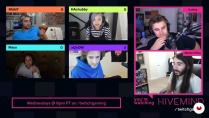
Continue by looking at the current video call situation and see how to adapt this tool for efficiency by incorporating innovative platforms. Then, discover the concept of streamworking, a new approach to offering microservices.
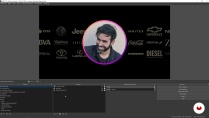
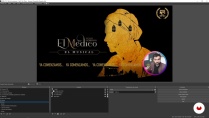
It's time to set up your workstation. Find out what programs you need to start streaming and install them on your computer. Learn the basics of working with OBS, like importing and customizing projects, and how to integrate it into your video calls.
See how to optimize your image quality, create the right background or set based on what you're doing, and implement some small changes that can make a world of difference. Finally, Kali gives you some valuable tips on increasing productivity during your video call work sessions.
- 100% positive reviews (25)
- 592 students
- 14 lessons (2h 21m)
- 27 additional resources (2 files)
- Online and at your own pace
- Available on the app
- Audio: Spanish, German, English, French, Indonesian, Italian, Dutch, Polish, Portuguese, Romanian, Turkish
- Spanish · English · Portuguese · German · French · Italian · Polish · Dutch · Turkish · Romanian · Indonesian
- Level: Beginner
- Unlimited access forever
What is this course's project?
Transform your computer into a streamworking station using Kali's setup as a base design that you can customize according to your needs.

Who is this online course for?
Professionals who use video calls on a daily basis or who are looking for new tools to make their virtual meetings more productive.
Requirements and materials
No specific knowledge is necessary for this course. For materials, you need a computer that's powerful enough to seamlessly and simultaneously run multiple software programs, a webcam, and a second monitor to improve the streaming experience (optional).

Reviews

Kali Romiglia
A course by Kali Romiglia
In addition to being a digital creator and creative consultant, Kali Romiglia is an expert in remote work and interface design. Over the course of his extensive professional career, his work has earned him more than 20 awards in 16 countries.
He has collaborated with brands like Coca-Cola, Google, Mitsubishi, L'Oréal, Nokia, Toyota, and more, providing solutions as a production director, interface designer, art director, and tech consultant and developer.
Content
-
U1
Introduction
-
About Me
-
Influences
-
-
U2
From video calls to streaming
-
Are video calls efficient?
-
Rethink and experiment
-
The beginnings of streaming
-
-
U3
The montage
-
Prepare the streaming system
-
Import the project and customize the scenes 1
-
Import the project and customize the scenes 2
-
Connect the project to video calls
-
Optimize quality
-
We make video calls
-
-
U4
Tips and optimization
-
Tips for streaming
-
Do you have to be at the forefront to be professional?
-
A community of streamers
-
-
FP
Final project
-
"Remote Work: Creative Sessions over Video Call "
-
What to expect from a Domestika course
-
Learn at your own pace
Enjoy learning from home without a set schedule and with an easy-to-follow method. You set your own pace.
-
Learn from the best professionals
Learn valuable methods and techniques explained by top experts in the creative sector.
-
Meet expert teachers
Each expert teaches what they do best, with clear guidelines, true passion, and professional insight in every lesson.
-
Certificates
PlusIf you're a Plus member, get a custom certificate signed by your teacher for every course. Share it on your portfolio, social media, or wherever you like.
-
Get front-row seats
Videos of the highest quality, so you don't miss a single detail. With unlimited access, you can watch them as many times as you need to perfect your technique.
-
Share knowledge and ideas
Ask questions, request feedback, or offer solutions. Share your learning experience with other students in the community who are as passionate about creativity as you are.
-
Connect with a global creative community
The community is home to millions of people from around the world who are curious and passionate about exploring and expressing their creativity.
-
Watch professionally produced courses
Domestika curates its teacher roster and produces every course in-house to ensure a high-quality online learning experience.
FAQs
You’ll learn how to optimize video calls, design efficient interfaces, use OBS Studio for professional streaming, and apply usability principles, multidisciplinary integration, and collaborative tools in digital settings.
Yes, the course is designed for intermediate-level individuals who already have basic experience in design, technology, or audiovisual production and want to deepen and professionalize their skills in digital environments and video calls.
You’ll need a computer with internet access, a webcam, microphone, and preferably install OBS Studio plus access to platforms like Zoom or Google Meet. Basic experience with digital tools and audiovisual editing is recommended.
This course is aimed at designers, creatives, educators, consultants, streamers, and professionals looking to enhance the experience of video calls, virtual meetings, and digital content production.
You’ll be able to customize your video calls, improve interaction and visual quality, optimize real-time collaboration, and offer innovative services to your clients or audiences.
The course teaches how to set up OBS Studio, use the virtual camera, and sync custom scenes to broadcast professional visual content on Zoom, Meet, and other platforms.
You’ll learn to install and use essential plugins, configure scenes, add multimedia sources, customize transitions, use keyboard shortcuts, and share your screen or mobile devices live.

Tremendo curso. Como siempre Kali no decepciona.
Muito bom!
Excelente curso
Este curso me ha abierto la mente exponencialmente y por consecuencias me muestra un mundo nuevo de posibilidades para hacer un trabajo innovador, dinámico y sobre todo menos ABURRIDO.
Mil gracias a Kali, eres un super tutor y a la gente de DOMESTIKA por tener siempre cursos espectaculares que nos ayudan a nosotros a crecer profesionalmente y personalmente.
UN FUERTE ABRAZO!!!
excelente mente explicado... gracias