Minimalist Graphic Design for Big Ideas
A course by Julian Montague , Graphic Designer and Artist


Create bold graphic elements that communicate big ideas by exploring a visual design process that experiments with the digital tools in Illustrator

When design meets creative thinking, striking imagery has the power to express complex messages in a compelling and memorable way. Award-winning graphic designer and artist Julian Montague strives to create the strongest and most compelling visual solutions to complicated topics. His work has appeared in numerous galleries, books, on posters, and more. Julian’s clients include Sonos and Continental Tires, and he has published a book on his satirical and abstract take on the science behind the stray shopping carts of Eastern North America.
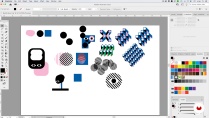
In this course, he teaches you how to think conceptually and use words and graphics to communicate complex themes using Adobe Illustrator. Learn how to generate ideas, improve your observation skills and experiment with colors, spacing, and vector shapes to create bold designs.
What will you learn in this online course?
10 lessons & 16 downloads

- 98% positive reviews (146)
- 3,123 students
- 10 lessons (1h 35m)
- 16 additional resources (5 files)
- Online and at your own pace
- Available on the app
- Audio: English
- English · Spanish · Portuguese · German · French · Italian · Polish · Dutch
- Level: Beginner
- Unlimited access forever
Recommended software for this course
 Adobe Illustrator
What is this course's project?
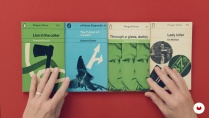
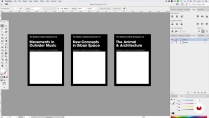
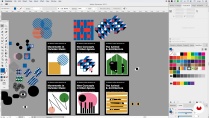
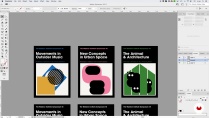
Create a set of three posters or book covers for a fictional lecture series, in the same graphic style with distinct themes.

Projects by course students


Who is this online course for?
This course is for beginner to intermediate designers with an interest in creating striking graphics that communicate ideas.
Requirements and materials
Basic knowledge of a vector based program like Adobe Illustrator is necessary.
In terms of materials, you will need access to a device with Illustrator installed.

Reviews

Julian Montague
A course by Julian Montague
As an artist, graphic designer, illustrator, and photographer, Julian Montague’s professional repertoire spans a wide range of approaches and mediums. His father taught art and design history and as such, Julian was exposed to the arts as a child, which he attributes to being his initial influence.
With a bold, recognizable, and often conceptual aesthetic, his work has appeared in numerous galleries, books, on posters, as murals and more. Julian’s clients include Sonos and Continental Tires, and he won a Silver National Addy award for his 2013 poster series State of America. He has also published a book on his satirical and abstract take on the science behind the stray shopping carts entitled The Stray Shopping Carts of Eastern North America: A Guide to Field Identification.
Content
-
U1
Introduction
-
About Me
-
Influences
-
-
U2
Understanding Visual Design and Illustrator Tools
-
Design Research
-
Creating Meaning with Text and Images
-
Illustrator Tools and Sketching
-
-
U3
Creating A Visual Design of Your Own
-
Creating the Layout Template
-
Sketching with Purpose
-
Finalizing the Series
-
-
U4
What to Do with Your Design
-
Turning Your Designs into Posters
-
How to Promote Your Personal Project
-
-
FP
Final project
-
Minimalist Graphic Design for Big Ideas
-
What to expect from a Domestika course
-
Learn at your own pace
Enjoy learning from home without a set schedule and with an easy-to-follow method. You set your own pace.
-
Learn from the best professionals
Learn valuable methods and techniques explained by top experts in the creative sector.
-
Meet expert teachers
Each expert teaches what they do best, with clear guidelines, true passion, and professional insight in every lesson.
-
Certificates
PlusIf you're a Plus member, get a custom certificate signed by your teacher for every course. Share it on your portfolio, social media, or wherever you like.
-
Get front-row seats
Videos of the highest quality, so you don't miss a single detail. With unlimited access, you can watch them as many times as you need to perfect your technique.
-
Share knowledge and ideas
Ask questions, request feedback, or offer solutions. Share your learning experience with other students in the community who are as passionate about creativity as you are.
-
Connect with a global creative community
The community is home to millions of people from around the world who are curious and passionate about exploring and expressing their creativity.
-
Watch professionally produced courses
Domestika curates its teacher roster and produces every course in-house to ensure a high-quality online learning experience.
FAQs
Domestika's courses are online classes that provide you with the tools and skills you need to complete a specific project. Every step of the project combines video lessons with complementary instructional material, so you can learn by doing. Domestika's courses also allow you to share your own projects with the teacher and with other students, creating a dynamic course community.
All courses are 100% online, so once they're published, courses start and finish whenever you want. You set the pace of the class. You can go back to review what interests you most and skip what you already know, ask questions, answer questions, share your projects, and more.
The courses are divided into different units. Each one includes lessons, informational text, tasks, and practice exercises to help you carry out your project step by step, with additional complementary resources and downloads. You'll also have access to an exclusive forum where you can interact with the teacher and with other students, as well as share your work and your course project, creating a community around the course.
You can redeem the course you received by accessing the redeeming page and entering your gift code.
 Adobe Illustrator
guillermina_scaraffia
Muy lindo curso ! lo recomiendo
View translation
Hide translation
abbasovemin
that's just perfect course
doricazorica7
Really enjoyed it!
r_maresescu
Great stuff! I love how everything is explained.
neilarmstrong
Really enjoyed this course, which shown me how simple graphic design can be and has helped me to not over complicate designs and less is more.