Lettering with Adobe Fresco: Create Tasteful Images with Words
A course by Nubia Navarro (nubikini) , Lettering Artist

Joined March 2016
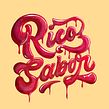
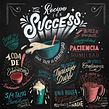

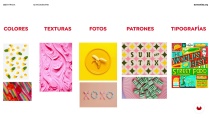
Draw typographic compositions full of exquisite colors and textures inspired by food
Joined March 2016

Food can be an infinite and delicious source of inspiration for your lettering projects. Lettering artist Nubia Navarro, better known as Nubikini by over 49K followers on Instagram, has found that the right combination of food textures and colors is a great way to spice up letters.
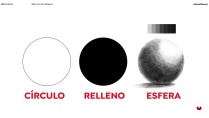
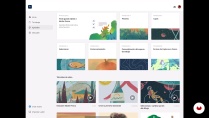
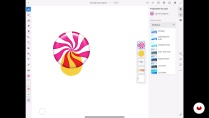
After teaching Calligraphy and Lettering for Instagram with Procreate, Nubikini is back to show you how to create food-inspired typographic compositions with Adobe Fresco. In this course, master the tools of this app and learn how to digitally paint with original, mouth-watering textures. Transform your design into physical art by putting it on a tote bag or framing it to decorate your kitchen.
What will you learn in this online course?
20 lessons & 35 downloads
- 97% positive reviews (38)
- 1,369 students
- 20 lessons (4h 4m)
- 35 additional resources (13 files)
- Online and at your own pace
- Available on the app
- Audio: Spanish
- Spanish · English · Portuguese · German · French · Italian · Polish · Dutch · Turkish · Romanian · Indonesian
- Level: Beginner
- Unlimited access forever
Recommended software & tools for this course
 Adobe Fresco
What is this course's project?
Create a tasteful typographic composition inspired by your favorite foods and transform your design into physical art by putting it on a tote bag or framing it as a decorative painting.

Projects by course students


Who is this online course for?
Typography and lettering lovers as well as anyone who enjoys experimenting with different techniques, approaches, and materials to express their creative side.
Requirements and materials
Basic knowledge of lettering is needed to take this course.
As for materials, all you need is an iPhone, an iPad (both with iOS 13 or later) or a computer with Adobe Fresco.

Reviews

Nubia Navarro (nubikini)
A course by Nubia Navarro (nubikini)
Nubia Navarro is a Venezuelan graphic designer living in Bogotá, Colombia who loves typography and lettering and also likes to do photography for fun. She has more than five years of experience creating lettering compositions and content for social media and has worked for major brands such as Facebook, Marriott, adidas, Samsung, Coca-Cola, and UNICEF.
Nubia enjoys sharing her knowledge with people who are equally passionate about calligraphy. She is also a firm believer that letters have the power to change both brands and lives, and when combined with music, nothing can go wrong.
Content
-
U1
The snack
-
Presentation
-
Influences 1
-
Influences 2
-
-
U2
The entrance
-
Mood board
-
Work flow
-
Fresco 1 interface
-
Fresco 2 interface
-
-
U3
The garrison
-
Parts of the letter: Proportions
-
Guide lines: Grid
-
Sketches 1
-
Sketches 2
-
-
U4
The main course
-
Using Pixel Brushes 1
-
Pixel brush 2
-
Live Brushes 1
-
Live brush 2
-
Vector brush 1
-
Vector brush 2
-
-
U5
Dessert
-
Export types
-
Export formats
-
Configure and Export video interval
-
-
FP
Final project
-
Lettering with Adobe Fresco: cook pictures with words and letters
-
What to expect from a Domestika course
-
Learn at your own pace
Enjoy learning from home without a set schedule and with an easy-to-follow method. You set your own pace.
-
Learn from the best professionals
Learn valuable methods and techniques explained by top experts in the creative sector.
-
Meet expert teachers
Each expert teaches what they do best, with clear guidelines, true passion, and professional insight in every lesson.
-
Certificates
PlusIf you're a Plus member, get a custom certificate signed by your teacher for every course. Share it on your portfolio, social media, or wherever you like.
-
Get front-row seats
Videos of the highest quality, so you don't miss a single detail. With unlimited access, you can watch them as many times as you need to perfect your technique.
-
Share knowledge and ideas
Ask questions, request feedback, or offer solutions. Share your learning experience with other students in the community who are as passionate about creativity as you are.
-
Connect with a global creative community
The community is home to millions of people from around the world who are curious and passionate about exploring and expressing their creativity.
-
Watch professionally produced courses
Domestika curates its teacher roster and produces every course in-house to ensure a high-quality online learning experience.
FAQs
What are Domestika's online courses?
Domestika courses are online classes that allow you to learn new skills and create incredible projects. All our courses include the opportunity to share your work with other students and/or teachers, creating an active learning community. We offer different formats:
Original Courses: Complete classes that combine videos, texts, and educational materials to complete a specific project from start to finish.
Basics Courses: Specialized training where you master specific software tools step by step.
Specialization Courses: Learning paths with various expert teachers on the same topic, perfect for becoming a specialist by learning from different approaches.
Guided Courses: Practical experiences ideal for directly acquiring specific skills.
Intensive Courses (Deep Dives): New creative processes based on artificial intelligence tools in an accessible format for in-depth and dynamic understanding.
When do the courses start and when do they finish?
All courses are 100% online, so once they're published, courses start and finish whenever you want. You set the pace of the class. You can go back to review what interests you most and skip what you already know, ask questions, answer questions, share your projects, and more.
What do Domestika's courses include?
The courses are divided into different units. Each one includes lessons, informational text, tasks, and practice exercises to help you carry out your project step by step, with additional complementary resources and downloads. You'll also have access to an exclusive forum where you can interact with the teacher and with other students, as well as share your work and your course project, creating a community around the course.
Have you been given a course?
You can redeem the course you received by accessing the redeeming page and entering your gift code.
 Adobe Fresco
Las explicaciones son buenas, detalladas es un programa muy parecido a procreate pero en mi gusto mas fácil de entender de desarrollar.
Excelente curso, para aplicar lo aprendido se debe practicar y practicar
Me gustó mucho y disfruté demasiado el curso, muy recomendable.
J’ai vraiment adoré le cours de lettering sur Adobe Fresco ! Les explications étaient claires et les exercices pratiques vraiment utiles pour améliorer mes compétences en design de lettres. Je recommande vivement ce cours à tous ceux qui souhaitent perfectionner leur technique de lettrage numérique.
Muy bueno!