Pictorial Portraits Using Digital Techniques
A course by Alex de Marcos García , Illustrator



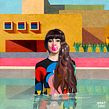

Learn how to use Photoshop to create illustrations using pixels as brushstrokes

Making portraits with striking colors, settings, and finishes, combining painting and digital techniques is one of the specialties of Alex de Marcos, an illustrator from Madrid who has been making his way onto the Spanish art scene. His works can be found in all areas of illustration, from children's books, through the biography of Kurt Cobain and stickers for Instagram, to advertising for Coca-Cola, Nike, and Bombay, among other renowned brands.
In this course, Alex teaches you step by step how to make a digital illustration in Adobe Photoshop achieving a pictorial and organic finish. Learn how to use color, create amazing environments, and give texture to your composition, making the technique your personal brand. Alex will also provide a number of digital resources and give valuable tips on how to succeed on Instagram.
What will you learn in this online course?
23 lessons & 64 downloads
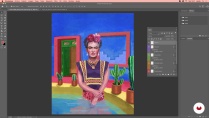

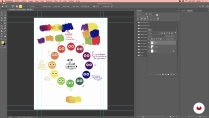
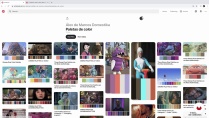

- 99% positive reviews (707)
- 10,205 students
- 23 lessons (3h 45m)
- 64 additional resources (44 files)
- Online and at your own pace
- Available on the app
- Audio: Spanish, English, French, Indonesian, Italian, Portuguese, Romanian, Turkish
- Spanish · English · Portuguese · German · French · Italian · Polish · Dutch · Turkish · Romanian · Indonesian
- Level: Beginner
- Unlimited access forever
Recommended software & tools for this course
 Adobe Photoshop
What is this course's project?
Make an illustrated portrait in Photoshop, combining powerful colors, an eye-catching environment, and a unique hand-painted finish.
Projects by course students


Who is this online course for?
Anyone who is interested in digital illustration and wants to do the process, step by step, from the sketch to the final finishes, with the aim of surprising by applying a unique painting technique.
Requirements and materials
Basic knowledge of Adobe Photoshop is needed.
As for the materials, you must have a computer with Photoshop installed and a graphics tablet or iPad —Alex will show you a way to turn your iPad into a graphic drawing tablet—.

Reviews

Alex de Marcos García
A course by Alex de Marcos García
Madrid-born artist Alex de Marcos has dedicated himself for over 10 years to illustrating pieces for all areas of illustration, from creations for the publishing market to advertising pieces for agencies in different countries. His works have been printed in children's books, Kurt Cobain's biography, stickers for Instagram, advertising for Coca-cola, Nike, Fnac, Bombay, and many other renowned brands.
He has painted paintings for film decoration such as the Spanish film Get Her... If You Can and murals for Mercedes Fashion Week and the Madrid City Hall. He has been recognized internationally with different awards, including Silver in the illustration category at ADCI (Italy).
Content
-
U1
Introduction
-
Presentation
-
Influences
-
What Will We Do in the Course?
-
-
U2
What We Need to Know and Have
-
About Adobe Photoshop
-
Color Theory
-
References and Documentation
-
-
U3
Let's Do It
-
Composition and Collage Sketch
-
Sketch to Line: Shadow Map 1
-
Sketch to Line: Shadow Map 2
-
Sketch to Line: Shadow Map 3
-
Sketch to Line: Shadow Map 4
-
Line sketch: shadow map 5
-
Color Palette and First Brush Strokes 1
-
Color Palette and First Brush Strokes 2
-
Color Palette and First Brush Strokes 3
-
Color Palette and First Brush Strokes 4
-
Fashion and Clothing 1
-
Fashion and Clothing 2
-
-
U4
Digital Plasticity
-
Plasticity
-
Export and Succeed
-
See You on Instagram
-
Start Being an Illustrator
-
Bonus Track
-
-
FP
Final project
-
Pictorial Portraits Using Digital Techniques
-
What to expect from a Domestika course
-
Learn at your own pace
Enjoy learning from home without a set schedule and with an easy-to-follow method. You set your own pace.
-
Learn from the best professionals
Learn valuable methods and techniques explained by top experts in the creative sector.
-
Meet expert teachers
Each expert teaches what they do best, with clear guidelines, true passion, and professional insight in every lesson.
-
Certificates
PlusIf you're a Plus member, get a custom certificate signed by your teacher for every course. Share it on your portfolio, social media, or wherever you like.
-
Get front-row seats
Videos of the highest quality, so you don't miss a single detail. With unlimited access, you can watch them as many times as you need to perfect your technique.
-
Share knowledge and ideas
Ask questions, request feedback, or offer solutions. Share your learning experience with other students in the community who are as passionate about creativity as you are.
-
Connect with a global creative community
The community is home to millions of people from around the world who are curious and passionate about exploring and expressing their creativity.
-
Watch professionally produced courses
Domestika curates its teacher roster and produces every course in-house to ensure a high-quality online learning experience.
FAQs
What are Domestika's online courses?
Domestika courses are online classes that allow you to learn new skills and create incredible projects. All our courses include the opportunity to share your work with other students and/or teachers, creating an active learning community. We offer different formats:
Original Courses: Complete classes that combine videos, texts, and educational materials to complete a specific project from start to finish.
Basics Courses: Specialized training where you master specific software tools step by step.
Specialization Courses: Learning paths with various expert teachers on the same topic, perfect for becoming a specialist by learning from different approaches.
Guided Courses: Practical experiences ideal for directly acquiring specific skills.
Intensive Courses (Deep Dives): New creative processes based on artificial intelligence tools in an accessible format for in-depth and dynamic understanding.
When do the courses start and when do they finish?
All courses are 100% online, so once they're published, courses start and finish whenever you want. You set the pace of the class. You can go back to review what interests you most and skip what you already know, ask questions, answer questions, share your projects, and more.
What do Domestika's courses include?
The courses are divided into different units. Each one includes lessons, informational text, tasks, and practice exercises to help you carry out your project step by step, with additional complementary resources and downloads. You'll also have access to an exclusive forum where you can interact with the teacher and with other students, as well as share your work and your course project, creating a community around the course.
Have you been given a course?
You can redeem the course you received by accessing the redeeming page and entering your gift code.
 Adobe Photoshop
expectacular!!!! y super divertido quede facinada, encontré en este el curso todo lo buscaba .❤️ hasta risas sobre todo en teoria del color.; precioso curso entretenido lo recomiendo a ojos cerrados!!!!
I've been familiar with Alex de Marcos García's work for some time, and I'm glad with this course.
From what I've seen so far, it contains very interesting content, and my work methods are similar, so I hope to gain valuable knowledge.
great course!
TOP
Excelente