Rotoscoping: Draw an Animation Frame by Frame
Editing the clip and things to keep in mind
Un curs de Gonzalo Cordero de Ciria , Pictor, ilustrator, animator, grafician de mișcare și storyboarder

S-a iunie 2014

S-a iunie 2014

Despre videoclip: Editing the clip and things to keep in mind
Prezentare generală
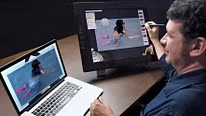
“When we select a video about which we intend to make a rotoscopia we must think about what is going to be better drawn, what level of detail and definition we are going to use in order not to go crazy and take centuries. Which assembly will be more interesting in drawing taking advantage of all the frames and eliminating as much as possible all the superfluous, but without losing the basic principles of anticipation and development animation. We will also see in this chapter how to edit the clip in After Effects. ”
În această lecție video, Gonzalo Cordero de Ciria abordează subiectul: Editing the clip and things to keep in mind , care face parte din cursul online Domestika: Rotoscoping: Draw an Animation Frame by Frame . Learn to draw over a real image with Photoshop, Art Rage, and After Effects.
Rezumatul cursului pentru: Rotoscoping: Draw an Animation Frame by Frame
-
Categorie
3D și animație -
Software
Adobe After Effects, Adobe Photoshop -
Zone
Animație, animație 2D, Film, video și televiziune, Ilustrație tradițională, Video

Gonzalo Cordero de Ciria
Un curs de Gonzalo Cordero de Ciria
Gonzalo Cordero a studiat Arte Frumoase și a menținut întotdeauna o relație strânsă cu arta, desenul și pictura. Ulterior, a lucrat în televiziune (Televisión Española, Jocurile Olimpice, Canal+, Canal Satélite Digital, Cuatro etc.), unde a devenit pas...
- 97% recenzii pozitive ( 224 )
- 1 elev
- 1 lecție ( 1 oră 1 metru )
- 1 resursă suplimentară (1 fișier)
- Online și în ritmul tău propriu
- Disponibil în aplicație
- Sunet: Spaniolă, Engleză
- Spaniolă · Engleză · Portugheză · german · franceză · italian · Lustrui · Olandeză · turc · Română · Indoneziană
- Nivel: Începător
- Acces nelimitat pentru totdeauna
Software și instrumente recomandate pentru acest curs
 Adobe After Effects
 Adobe Photoshop
Categorie
Zone