Introduction to Procreate
Course 5 – Layers: Private layer
By Román García Mora , Illustrator and 3D Modeler


About the video: Private layer
Overview
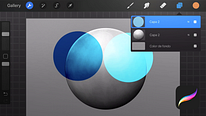
“In this lesson, we will learn how to use the Private Layer function to insert images into our illustration that will not be recorded in Accelerated Time Recording. We will see how to add an image as a private layer from the Actions Menu, how we can modify its content, how a private layer is identified in the layers panel and we will check that the content of these private layers is not recorded in the accelerated time recording.”
In this video lesson Román García Mora addresses the topic: Private layer, which is part of the Domestika online course: Course 5 – Layers. Discover the importance of layers in the digital illustration workflow.
Partial transcription of the video
“PROCREATE COURSE 5 LESSON 8 Private Layer In Procreate 5X we can insert images in our document that will not be recorded in time-laps recording thanks to the Private Layer feature. To create a private layer we need to add it from the Actions menu. If we slide to the left in the Add File options, Add Photo, Take Photo and Paste, we see that option to insert that image privately. In this case, I will insert a very rough 3D model of this dinosaur that I will use as a reference, but you can use any image that serves as a reference. In Layers, under the name of the layer it says that this layer ...”
This transcript is automatically generated, so it may contain mistakes.
Course summary for: Course 5 – Layers

Román García Mora
By Román García Mora
Román García is not only an illustrator but also a biologist, and since 2008, he has been working above all on scientific and informative illustration projects. His drawings have been published in acclaimed magazines including National Geographic and Quo Magazine. He also collaborates with the Real Jardín Botánico in Madrid to produce illustrations for the CSIC's Flora Iberica project.
His work consists of creating images of things that we cannot see because they belong to a past time, the world of imagination, or simply because they are not perceptible to the human eye. To achieve this, he uses digital illustration as the foundation for his work and combines it with traditional techniques, 3D modeling, and illustrative retouching.
- 0% positive reviews (0)
- 9 students
- 9 lessons (1h 7m)
- 5 additional resources (4 files)
- Online and at your own pace
- Available on the app
- Audio: Spanish, Romanian, Indonesian
- Spanish · English · Portuguese · German · French · Italian · Polish · Dutch · Turkish · Romanian · Indonesian
- Level: {beginner: "Beginner", intermediate: "Intermediate", advanced: "Advanced"}
- Unlimited access forever