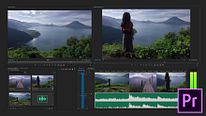
Introduction to Adobe Premiere Pro
Course 1 - Getting to Know Adobe Premiere Pro: Interface windows
By Juanmi Cristóbal , Video Editor and Director of Photography


About the video: Interface windows
Overview
“Premiere Pro offers us a fully customizable graphical interface, apart from different presets for people who are more accustomed to working with color, sound or effects among others. My recommendation is that, once you understand what each program window is for, organize it your way and save it. So you will have your personalized workspace. And do not worry, regardless of how you organize it, you will always have the opportunity to modify it. I teach you how to do it. ”
In this video lesson Juanmi Cristóbal addresses the topic: Interface windows, which is part of the Domestika online course: Course 1 - Getting to Know Adobe Premiere Pro. Get an introduction to the program, its interface, and the basic tools.
Partial transcription of the video
“In this lesson, I'll explain the windows of the interface of Premiere Pro. We'll see all of them, the Canvas, the Viewer, the container, the toolbar, the timeline and the audio boomer. Let's go to it. The most important one is the timeline, which would be this one below. This is where the editor builds the movie. Everything is built here, we have audio tracks, and video tracks with their various tools, but the movie will be built in this area. We go by parties, what do these two mean? This window, which is called Viewer, is the one that allows us to see what happens in the timeline. mean, d...”
This transcript is automatically generated, so it may contain mistakes.
Course summary for: Course 1 - Getting to Know Adobe Premiere Pro

Juanmi Cristóbal
By Juanmi Cristóbal
Juanmi Cristóbal has experience in a variety of fields, from graphic design, which he studied in his hometown of Zamora, Spain, to photography, postproduction, and video recording and editing.
In 2016, he joined his partners Javier Barbero and Sergio Llast to create the AV production company Fourminds, which works in both film and advertising and with clients like Samsung, Wacom, Rolling Stone, and Canal Sur.
In addition to teaching at Domestika, he shares his knowledge of technical photography, video editing with Premiere Pro, and DSLR video recording with students at the Escuela Arte Granada.
- 15 students
- 8 lessons (57m)
- 5 additional resources (1 files)
- Online and at your own pace
- Available on the app
- Audio: Spanish, French, Portuguese, English
- Spanish · English · Portuguese · German · French · Italian · Polish · Dutch · Turkish · Romanian · Indonesian
- Level: {beginner: "Beginner", intermediate: "Intermediate", advanced: "Advanced"}
- Unlimited access forever