Introduction to Figma
Course 6: Building a Prototype: Practice: build a prototype 5
By Arturo Servín , Web designer

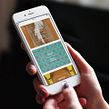



About the video: Practice: build a prototype 5
Overview
“Lastly, I'll show you how to finalize the prototype. In addition, you will see how my course project turned out. I will also explain to you how I use Figma Mirror to view the app.”
In this video lesson Arturo Servín addresses the topic: Practice: build a prototype 5, which is part of the Domestika online course: Course 6: Building a Prototype. Learn how to connect different screens and add interactions and animations to your prototype.
Partial transcription of the video
“INTRODUCTION TO FIGMA / COURSE 6 UNIT 8 Practice: building a prototype We have finished our application. We are going to test this prototype, not only in the sample that we have to do it from the app or from the application on the desktop, but let's see it in the final size. In this case I am going to do it from Figma Mirror, which is now also called Figma, and it has some very interesting issues that we are going to be able to work on. The first thing I have to do is download the application, open it and once you open it, it will ask you to be inside. I'm already logged into the Figma app ...”
This transcript is automatically generated, so it may contain mistakes.
Course summary for: Course 6: Building a Prototype
Arturo Servín
By Arturo Servín
Monky is a graphic designer specializing in web design. He has worked as a web designer for the magazine a! Design, for the Mexican design brand Tixinda and has collaborated with Dr. Morbito for different web projects. For several years he was part of the Adobe Community Professionals team in Mexico and has extensive experience teaching courses for both professionals and students.
He is currently the general director of La Constelación, a studio focused on digital marketing, e-commerce and web design.
- 0% positive reviews (0)
- 9 students
- 12 lessons (2h 23m)
- 8 additional resources (4 files)
- Online and at your own pace
- Available on the app
- Audio: Spanish
- Spanish · English · Portuguese · German · French · Italian · Polish · Dutch · Turkish · Romanian · Indonesian
- Level: {beginner: "Beginner", intermediate: "Intermediate", advanced: "Advanced"}
- Unlimited access forever