Advanced Adobe Photoshop
Course 2: 1, 2, 3… Fusion!: Contrast blending modes
By Carles Marsal , Graphic Designer and Visual Artist


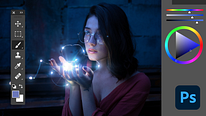
About the video: Contrast blending modes
Overview
“Contrast blending modes are used in all kinds of processes. In this case I will show you how to apply them, to adapt different textures that respect the brightness and colors of the images on which we apply them.”
In this video lesson Carles Marsal addresses the topic: Contrast blending modes, which is part of the Domestika online course: Course 2: 1, 2, 3… Fusion!. Learn how to use blending modes in photography and illustration.
Partial transcription of the video
“ADVANCED PHOTOSHOP / COURSE 2 LESSON 4 Contrast blending modes Contrast blend modes are applied in all kinds of situations. Here I'll show you the most common, which is to overlay a texture on an image. Let's see how to do it. Contrast blending modes do a number of things. For me the most important is that they allow us to apply textures in the most realistic way possible. But we can use them for many things beyond this. We will see some of them in the following lessons and courses. We will see specific cases in which they can be convenient. Here what I will do is apply this image, which I ...”
This transcript is automatically generated, so it may contain mistakes.
Course summary for: Course 2: 1, 2, 3… Fusion!
Carles Marsal
By Carles Marsal
Carles Marsal is a graphic designer and visual artist who works with a wide variety of national and international clients on graphic design, retouching, and illustration projects. He also teaches courses and seminars as an Adobe Certified Expert and Instructor of Photoshop, as well as conferences as an Adobe Influencer.
His projects have been featured in publications like Photoshop Magazine, Belio Magazine, Abduzeedo, Kuvva, Desktopography, and at events such Barcelona Creative, Blanc Festival, and Adobe Creative Days.
Carles has said "I am someone who loves what they do, so all my skills, years' of experience, and infinite passion go into each project, without exception, as a new and exciting challenge."
- 0% positive reviews (0)
- 12 students
- 6 lessons (56m)
- 10 additional resources (7 files)
- Online and at your own pace
- Available on the app
- Audio: Spanish, French, Portuguese, Italian
- Spanish · English · Portuguese · German · French · Italian · Polish · Dutch · Turkish · Romanian · Indonesian
- Level: {beginner: "Beginner", intermediate: "Intermediate", advanced: "Advanced"}
- Unlimited access forever