Pengantar Photoshop untuk Illustrator
Oleh Gemma Gould , Ilustrator

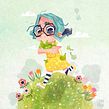



Pengantar Photoshop untuk Illustrator

Dasar-dasar Domestika · 6 kursus disertakan


Sebagai perangkat lunak standar industri di hampir semua sektor kreatif, Adobe Photoshop menawarkan kemungkinan tak terbatas bagi ilustrator, desainer, animator, dan semua jenis kreator profesional. Mengetahui cara menggunakannya tidak hanya meningkatkan profil Anda sebagai kreator, tetapi juga memungkinkan Anda bereksperimen dan mengeksplorasi beragam gaya, teknik, dan media.
Ilustrator Gemma Gould telah menggunakan Photoshop selama lebih dari satu dekade untuk menciptakan karya seni digital yang ceria dan tampak memukau. Dalam materi Dasar ini, ia mengajarkan cara menggunakan perangkat lunak ini dari awal, mulai dari alat dan antarmuka penting hingga mockup produk cetak akhir.
Jelajahi komposisi, bermainlah dengan warna, dan ciptakan karya ilustrasi yang lebih memukau dengan kiat dan trik ahli dari Gemma. Baik Anda seorang pemula atau ilustrator berpengalaman yang ingin menyegarkan diri, kembangkan alur kerja kreatif yang lebih efisien dan mulailah berkolaborasi dalam proyek ilustrasi Anda berikutnya hari ini.
Di kursus pertama Anda, perkenalkan diri Anda pada Adobe Photoshop dan pelajari cara menggunakan antarmuka dan alat-alatnya. Pelajari cara membuat dan mengatur dokumen baru, serta cara mengatur ruang kerja sesuai preferensi Anda.
Di kursus kedua, Gemma akan mengajarkan Anda cara menggunakan beberapa alat gambar paling penting di Photoshop untuk membuat sketsa komposisi, serta cara bereksperimen dengan pengaturan kuas dan membuat kuas Anda sendiri. Dapatkan beberapa kiat tentang komposisi dan pelajari cara memilih dan menata ulang elemen untuk menyempurnakan tata letak Anda.
Kursus ketiga membahas tentang warna. Jelajahi teori warna dasar, cara memilih dan membuat palet warna, serta cara menggunakan alat penyunting warna Photoshop. Temukan cara menyempurnakan karya seni yang dibuat secara tradisional setelah dipindai menggunakan berbagai alat koreksi dan penyembuhan warna, ideal untuk dicetak maupun daring.
Di kursus keempat, pelajari cara membuat karya seni menggunakan berbagai alat lukis, cara menambahkan tekstur pada karya kita, dan beberapa cara untuk memberikan kesan yang lebih tradisional. Cobalah menyusun gambar menggunakan elemen dan tekstur tradisional yang telah dipindai.
Kursus kelima mencakup sentuhan akhir, termasuk studi singkat tentang teknik pencahayaan dan teknik pengaburan untuk menambah kedalaman dan gerakan pada karya Anda. Simak cara menggabungkan alat-alat yang dipelajari selama kursus dengan menelusuri seluruh proses kreatif Gemma.
Di kursus terakhir, pelajari cara mengekspor karya seni Anda untuk aplikasi web dan cetak. Pelajari cara membuat PDF multi-halaman dan sebelum mengakhiri, buat animasi sederhana dari ilustrasi Anda.
Persyaratan Teknis
- ⦁ Komputer yang menjalankan Windows 7 (atau lebih tinggi) atau macOS El Capitan (atau lebih tinggi).
⦁ Adobe Photoshop CC: Anda dapat mengunduh versi uji coba 7 hari dari situs web resmi Adobe.
⦁ Anda akan memerlukan tablet grafis untuk bekerja lebih nyaman.
⦁ Pemindai atau kamera ponsel diperlukan untuk mendigitalkan karya seni tradisional Anda ke komputer.
- 100% ulasan positif ( 596 )
- 1 siswa
- 1 pelajaran ( 1 jam 1m )
- 1 kursus
- 1 unduhan (1 berkas)
- Online dan sesuai kecepatan Anda sendiri
- Tersedia di aplikasi
- Audio: Bahasa inggris, Spanyol (Latin), Perancis, Italia, Portugis, Turki
- Spanyol · Bahasa inggris · Portugis · Jerman · Perancis · Italia · Polandia · Belanda · Turki · Rumania · Indonesia
- Tingkat: Pemula
- Akses tak terbatas selamanya
Perangkat lunak & alat yang direkomendasikan untuk kursus ini
 Adobe Photoshop
Ulasan
Gemma Gould
Oleh Gemma Gould
Gemma Gould adalah ilustrator Inggris yang tinggal di pedesaan Shropshire yang indah. Terinspirasi dari teknik cetak tradisional, karya seninya memadukan bentuk-bentuk geometris yang semarak dengan detail bertekstur dan humor yang lembut.
Dengan le...
Isi
Kursus 1: Pendahuluan
-
U 1
Selamat datang
-
Selamat datang
-
-
U 2
Dokumen Baru
-
Dokumen Baru
-
-
U 3
Ruang kerja
-
Ruang kerja
-
-
U 4
Bilah Alat
-
Bilah Alat
-
-
U 5
Lapisan
-
Lapisan
-
-
U 6
Penggaris dan Panduan
-
Penggaris dan Panduan
-
-
U 7
Latihan: Menyiapkan Ilustrasi
-
Menyiapkan Ilustrasi
-
Kursus 2: Menggambar dan Komposisi
-
U 1
Alat Menggambar
-
Alat Menggambar
-
-
U 2
Kuas Pengeditan
-
Kuas Pengeditan
-
-
U 3
Membuat Kuas
-
Membuat Kuas
-
-
U 4
Memilih dan Mengedit Elemen
-
Memilih dan Mengedit Elemen
-
-
U 5
Memindai dan Mempersiapkan Sketsa Tradisional
-
Memindai dan Mempersiapkan Sketsa Tradisional
-
-
U 6
Membangun dengan Bentuk
-
Membangun dengan Bentuk
-
-
U 7
Latihan: Menyusun Gambar Anda
-
Menyusun Gambar Anda
-
Kursus 3: Menjelajahi Warna
-
U 1
Sedikit Teori Warna
-
Sedikit Teori Warna
-
-
U 2
Pilih Warna
-
Pilih Warna
-
-
U 3
Membuat Palet Warna
-
Membuat Palet Warna
-
-
U 4
Kontras
-
Kontras
-
-
U 5
Menyesuaikan Warna dan Nilai Karya Tradisional
-
Menyesuaikan Warna dan Nilai Karya Tradisional
-
-
U 6
Praktik: Studi Nilai
-
Studi Nilai
-
Kursus 4: Lukisan dan Tekstur
-
U 1
Ayo Melukis!
-
Ayo Melukis
-
-
U 2
Isi dan Gradien
-
Isi dan Gradien
-
-
U 3
Masker
-
Masker
-
-
U 4
Mode Pencampuran
-
Mode Pencampuran
-
-
U 5
Tekstur (Bagian 1)
-
Tekstur 1
-
-
U 6
Tekstur (Bagian 2)
-
Tekstur 2
-
-
U 7
Latihan: Karya Seni
-
Karya seni 1
-
Karya Seni 2
-
Kursus 5: Efek dan Sentuhan Akhir
-
U 1
Cahaya dan Bayangan
-
Cahaya dan Bayangan
-
-
U 2
Kedalaman, Pergerakan dan Fokus
-
Kedalaman, Pergerakan dan Fokus
-
-
U 3
Penyesuaian Keterbacaan Akhir
-
Penyesuaian Keterbacaan Akhir
-
-
U 4
Latihan: Menyatukan Semuanya
-
Menyatukan Semuanya 1
-
Menyatukan Semuanya 2
-
Menyatukan Semuanya 3
-
Menyatukan Semuanya 4
-
Menyatukan Semuanya 5
-
Kursus 6: Mengekspor Karya Seni Anda
-
U 1
Format untuk Pencetakan
-
Format untuk Pencetakan
-
-
U 2
Mengekspor untuk Web
-
Mengekspor untuk Web
-
-
U 3
Mempersembahkan Karya Seni
-
Mempersembahkan Karya Seni
-
-
U 4
Animasi (Bagian 1)
-
Animasi di Photoshop 1
-
-
U 5
Latihan: Animasi (Bagian 2)
-
Animasi di Photoshop 2
-
Tentang Domestika Basics
Domestika Basics adalah serangkaian kursus yang difokuskan pada pengajaran perangkat lunak yang paling umum digunakan oleh para profesional kreatif di seluruh dunia.
Kontennya telah disusun dengan cermat dan ditujukan bagi para pelajar yang memasuki bidang kreatif baru dan para profesional yang lebih berpengalaman yang ingin mengasah keterampilan mereka.
Belajar dengan guru Domestika terbaik melalui pelajaran praktis, banyak sumber daya, dan tingkat kesulitan progresif yang memungkinkan Anda melihat hasil sejak hari pertama.
Domestika Basics akan memungkinkan Anda meningkatkan permainan profesional Anda dan bersiap untuk mendapatkan proyek yang lebih baik.
-
Tanpa pengetahuan sebelumnya.
Domestika Basics memberi Anda semua yang Anda butuhkan untuk memulai bidang kreatif baru dan menjadi ahli di dalamnya.
-
Berfokus pada alat.
Temukan komponen utamanya, teknik, dan metode yang telah terbukti berhasil yang Anda butuhkan untuk menguasainya.
-
Belajar dengan cepat
Dengan pendekatan yang mudah dipahami dan langkah demi langkah, para profesional kami yang luar biasa akan mengajarkan Anda cara mendapatkan hasil maksimal dari program ini.
-
Sertifikat Plus
Jika Anda anggota Plus, dapatkan sertifikat khusus yang ditandatangani oleh pengajar Anda untuk setiap mata kuliah. Bagikan di portofolio, media sosial, atau di mana pun Anda suka.
 Adobe Photoshop
Mi mancano ancora delle lezioni, ma posso già dire che è stato molto utile, le spiegazioni sono molto chiare, si parte dalle basi e vengono dati molti consigli utili.
Good introductory course. However, this course could have been quite beneficial if the instructor had demonstrated the entire workflow process. It’s frustrating that you cannot fully engage because the final outcome or completion stage is abruptly interrupted by a transition. Consequently, you’re left with a polished final piece of artwork, yet you have no understanding of how it was created.
This is a very clear and easy to follow course. I would recommend!
много полезен, отличен
Aún no termino el curso, pero es muy claro, completo y entretenido. La profesora explica las cosa de manera clara y amena. Super recomendado!