Illustrate with Confidence and you will Triumph
Kursus oleh Conspiracystudio , Studio Ilustrasi

Bergabung sejak Februari 2014

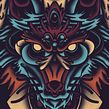


Create a powerful illustration for a bored customer
Bergabung sejak Februari 2014

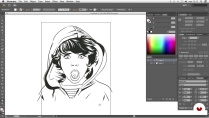
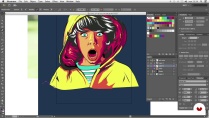
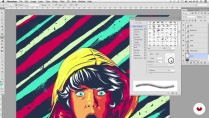
Join the fight against bored customers! It's good to be bland. In this course the ConspiracyStudio team teaches you its tricks to turn a boring ad into a job you want to add to your portfolio. Pim-pam, a bit of Illustrator, Wacom's release on indoor track, and very easily and without realizing you will be able to create very powerful illustrations. Do not say later that we did not warn you.
Apa yang akan Anda pelajari dalam kursus daring ini?
1 pelajaran & 1 unduhan
- 99% ulasan positif ( 164 )
- 1 siswa
- 1 pelajaran ( 1 jam 1m )
- 1 sumber daya tambahan (1 berkas)
- Online dan sesuai kecepatan Anda sendiri
- Tersedia di aplikasi
- Audio: Spanyol
- Spanyol · Bahasa inggris · Portugis · Jerman · Perancis · Italia · Polandia · Belanda · Turki
- Tingkat: Pemula
- Akses tak terbatas selamanya
Perangkat lunak & alat yang direkomendasikan untuk kursus ini
 Adobe Illustrator
 Adobe Photoshop
Untuk siapa kursus daring ini?
To you and any enlightened, those people who already illustrate or are beginning to illustrate and want to take a leap and appear elsewhere. This course is like a time machine: it gives you new techniques, you learn a few tricks, you put a Nirvana disc, and you get powerful results. Try and see.

Persyaratan dan bahan
Basic knowledge of Illustrator and Photoshop, if you have a Wacom better than better, and if not then nothing happens. It's better to be than to have.
Ulasan

Conspiracystudio
Kursus oleh Conspiracystudio
ConspiracyStudio telah bekerja selama bertahun-tahun untuk klien yang beragam, mulai dari label rekaman, agensi periklanan, merek pakaian, hingga beberapa klub malam di Barcelona. ConspiracyStudio didirikan tujuh tahun lalu, dengan fokus menyatukan has...
Isi
-
U 1
Introduction and project
-
Introduction to the study and the project
-
Influences and references
-
Practice with Wacom
-
-
U 2
Prepare everything to illustrate
-
Sketch composition
-
Retouch and adjust Photoshop
-
-
U 3
To illustrate and enjoy!
-
Ink in black
-
Colour
-
-
U 4
Final finishing
-
Retouch and adjustments in Photoshop
-
-
FP
Proyek akhir
-
Illustrate well what you like the least
-
Apa yang diharapkan dari kursus Domestika
-
Belajar dengan kecepatan Anda sendiri
Nikmati belajar dari rumah tanpa jadwal tetap dan dengan metode yang mudah diikuti. Anda bisa mengatur kecepatan belajar Anda sendiri.
-
Belajar dari para profesional terbaik
Pelajari metode dan teknik berharga yang dijelaskan oleh para ahli terkemuka di sektor kreatif.
-
Bertemu dengan guru ahli
Setiap pakar mengajarkan apa yang paling mereka kuasai, dengan pedoman yang jelas, semangat yang membara, dan wawasan profesional dalam setiap pelajaran.
-
Sertifikat
PlusJika Anda anggota Plus, dapatkan sertifikat khusus yang ditandatangani oleh pengajar Anda untuk setiap mata kuliah. Bagikan di portofolio, media sosial, atau di mana pun Anda suka.
-
Dapatkan kursi baris depan
Video berkualitas tinggi, jadi Anda tidak akan melewatkan satu detail pun. Dengan akses tak terbatas, Anda dapat menontonnya sesering yang Anda butuhkan untuk menyempurnakan teknik Anda.
-
Berbagi pengetahuan dan ide
Ajukan pertanyaan, minta masukan, atau tawarkan solusi. Bagikan pengalaman belajar Anda dengan siswa lain di komunitas yang sama bersemangatnya dengan Anda dalam hal kreativitas.
-
Terhubung dengan komunitas kreatif global
Komunitas ini merupakan rumah bagi jutaan orang dari seluruh dunia yang ingin tahu dan bersemangat untuk mengeksplorasi dan mengekspresikan kreativitas mereka.
-
Tonton kursus yang diproduksi secara profesional
Domestika menyusun daftar guru dan memproduksi setiap kursus secara internal untuk memastikan pengalaman belajar daring berkualitas tinggi.
Tanya Jawab Umum
You’ll learn how to create vector illustrations, digital inking, pressure-sensitive brush handling, composition, texture integration, and Photoshop retouching to produce professional, print-ready images.
The course is designed for people with basic knowledge of Illustrator and Photoshop, ideal for intermediate learners looking to refine their digital illustration techniques and workflow.
Yes, it’s recommended to use a Wacom-style graphics tablet to take advantage of pressure control and precision in your strokes, though some techniques can be adapted using a mouse.
You should have Adobe Illustrator and Adobe Photoshop installed on your computer, preferably the latest versions to access all the features covered.
You can import an image via File > Place, then lock the base layer to draw over it with pen and brush tools without altering the original reference.
In Illustrator’s brush settings, enable pressure-based stroke width variation so your lines respond to how hard you press with your tablet pen.
You’ll learn to ink over base photos, work with gestural lines, connect broken strokes, and apply variable line weights to highlight details and create clean, expressive illustrations.
 Adobe Illustrator
 Adobe Photoshop
BREVE E EFICIENTE!
Excelente curso, muy bien explicado y super dinámico.
Excelente curso, muchos aprendizajes en ilustración.
muy recomendable el curso muy dinamico que da una buena enseñanza, ayuda para los que necesitamos aprender la ilustracion, lo recomiendo mucho.
Me encanto el contenido del curso