SVG Vectorial Graphics: Illustrate and Animate with Code
Kursus oleh Javier Usobiaga Ferrer, Desainer web



Learn to create vector illustrations for your website, from basic lines to interactive animations

If you've ever wanted to combine the technical power of web programming and the creative freedom of graphic design, this course is for you. Javier Usobiaga, web designer and cofounder of Swwweet studio, teaches you how to get the most out of scalable vector graphics (SVG), an interactive and responsive vector file format designed for web browsers as an alternative to JPG, PNG, and GIF file types. In this online course, discover the effects, filters, and animations you can use to create your own interactive illustrations with HTML, CSS, and JavaScript code.
Javier also teaches Introduction to Responsive Web Development with HTML and CSS on Domestika, a course that walks you through the fundamentals of front-end web development and helps you build the foundations you need for this course on SVG.
Apa yang akan Anda pelajari dalam kursus daring ini?
1 pelajaran & 1 unduhan



Apa yang termasuk dalam kursus ini?
Start by exploring Javier Usobiaga's work as well as his influences from the world of SVG illustration and animation.
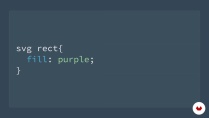
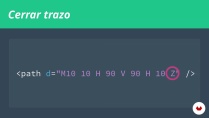
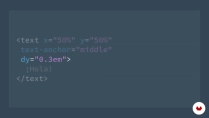
Next, explore how the SVG format works at its simplest level to learn how to work with it and use it to your advantage. Get back to basics by writing code for an image using only a code editor, setting visual editors aside to understand the foundational mechanics. Learn to apply styles with attributes and CSS, and then delve into line, polyline, polygon, and path elements to create an endless variety of points, lines, and curves. Find out how to insert text tags and discover viewBox attributes to generate virtual windows allowing you to zoom in and define the visible portion of an image.
Once you're familiar with the basics, it's time to use other optimization features like vector editors and coding tools to group, define, and reuse SVG elements—effective and efficient alternatives to writing endless lines of code.
Then learn how to embed SVG elements in a website as Javier walks you through the various ways to incorporate content images, background images, and JavaScript coding. Explore ways to apply SVG to icons, its role in responsive websites, tips to improve legibility on screen, and methods for optimizing its application on all web browsers.
Discover SVG effects like transformations, gradients, patterns, masks, and filters, as well as different types of animations such as CSS, sequential, line, and interactive animations. To wrap up, challenge yourself with more advanced types, including JavaScript animations, animated checkboxes, morphing, and path-guided animations.
- 98% ulasan positif ( 273 )
- 1 siswa
- 1 pelajaran ( 1 jam 1m )
- 1 sumber daya tambahan (1 berkas)
- Online dan sesuai kecepatan Anda sendiri
- Tersedia di aplikasi
- Audio: Spanyol, Bahasa inggris, Perancis, Italia, Portugis, Turki
- Spanyol · Bahasa inggris · Portugis · Italia · Perancis · Turki
- Tingkat: Pemula
- Akses tak terbatas selamanya
Perangkat lunak & alat yang direkomendasikan untuk kursus ini
 Adobe Illustrator
 Sketch
Apa proyek kursus ini?
Create an illustration with animated vector images. You can choose any theme you like and make your project as simple or as complex as you want; the goal is for you to apply the tools explored throughout the course.

Proyek oleh mahasiswa kursus


Untuk siapa kursus daring ini?
Programmers, designers, illustrators, and anyone who's interested in design and wants to tackle new projects with HTML and CSS.
Persyaratan dan bahan
You need basic knowledge of HTML and CSS to take this course.
As for materials and tools, you need a computer, a code editor, and a vector-graphics editor like Illustrator, Sketch, Inkscape, or similar software.

Ulasan

Javier Usobiaga Ferrer
Kursus oleh Javier Usobiaga Ferrer
Javier Usobiaga telah berkarier sebagai desainer web dan pengembang front-end selama lebih dari 10 tahun. Ia adalah salah satu pendiri studio Swwweet, bersama Marta Armada, yang berspesialisasi dalam merancang situs web responsif dari konsep awal hingg...
Isi
-
U 1
Introduction
-
Presentation
-
Influences
-
-
U 2
SVG Basic
-
Labels and basic attributes
-
Styles in SVG
-
Line, polyline, and polygon labels
-
Stroke label (path)
-
The viewbox attribute
-
Text tags
-
-
U 3
Tools and optimization
-
Vector editors and export
-
Organization of SVG
-
SVG optimization
-
-
U 4
Incorporating SVG to the web
-
Ways to load an SVG on the web
-
Icons systems
-
SVG responsive
-
Accessibility in SVG
-
Support in browsers
-
-
U 5
Effects in SVG
-
Transformations
-
Gradients
-
Patterns
-
Masks and clipping paths
-
Filters
-
-
U 6
Animation in SVG
-
Types of animation in SVG
-
Animation with CSS
-
Sequence animation
-
Drawn animation
-
Interactive animation
-
-
U 7
Interaction and advanced animation
-
Animation with JavaScript
-
JavaScript libraries for animation
-
Animated checkbox
-
Mutation (morphing) in SVG
-
Animation along a stroke
-
Inspiration
-
-
FP
Proyek akhir
-
SVG vector graphics: illustrate and animate with code
-
Apa yang diharapkan dari kursus Domestika
-
Belajar dengan kecepatan Anda sendiri
Nikmati belajar dari rumah tanpa jadwal tetap dan dengan metode yang mudah diikuti. Anda bisa mengatur kecepatan belajar Anda sendiri.
-
Belajar dari para profesional terbaik
Pelajari metode dan teknik berharga yang dijelaskan oleh para ahli terkemuka di sektor kreatif.
-
Bertemu dengan guru ahli
Setiap pakar mengajarkan apa yang paling mereka kuasai, dengan pedoman yang jelas, semangat yang membara, dan wawasan profesional dalam setiap pelajaran.
-
Sertifikat
PlusJika Anda anggota Plus, dapatkan sertifikat khusus yang ditandatangani oleh pengajar Anda untuk setiap mata kuliah. Bagikan di portofolio, media sosial, atau di mana pun Anda suka.
-
Dapatkan kursi baris depan
Video berkualitas tinggi, jadi Anda tidak akan melewatkan satu detail pun. Dengan akses tak terbatas, Anda dapat menontonnya sesering yang Anda butuhkan untuk menyempurnakan teknik Anda.
-
Berbagi pengetahuan dan ide
Ajukan pertanyaan, minta masukan, atau tawarkan solusi. Bagikan pengalaman belajar Anda dengan siswa lain di komunitas yang sama bersemangatnya dengan Anda dalam hal kreativitas.
-
Terhubung dengan komunitas kreatif global
Komunitas ini merupakan rumah bagi jutaan orang dari seluruh dunia yang ingin tahu dan bersemangat untuk mengeksplorasi dan mengekspresikan kreativitas mereka.
-
Tonton kursus yang diproduksi secara profesional
Domestika menyusun daftar guru dan memproduksi setiap kursus secara internal untuk memastikan pengalaman belajar daring berkualitas tinggi.
Tanya Jawab Umum
SVG (Scalable Vector Graphics) is an XML-based format for creating vector graphics that scale without losing quality. It’s widely used in web development for icons, illustrations, animations, and interactive graphics.
This course is designed for people with intermediate web development skills. Basic experience with HTML, CSS, and JavaScript is recommended to get the most out of the material.
You should have a basic understanding of HTML, CSS, and JavaScript, plus some familiarity with a code editor. You don’t need to be an expert, but a foundation in web technologies will help you keep up with the course.
You’ll learn how to create custom SVG graphics, animate elements using CSS and JavaScript, integrate icons, apply advanced styling, work with paths, gradients, and patterns, and optimize SVG files for the web.
The course teaches you how to animate SVGs by accessing the DOM and modifying attributes with JavaScript, as well as using CSS keyframes to create visual effects, transitions, and animation sequences.
The course explains that SVG attributes like fill and stroke allow direct styling, while CSS offers greater control, reusability, and easier maintenance—especially useful in large projects and reusable components.
You’ll learn to use the viewBox attribute, adjust preserveAspectRatio, and apply responsive design techniques so your SVGs fluidly adapt to any device or resolution.
 Adobe Illustrator
 Sketch
Muy puntual, da la clase muy bien y es entendible, con ejercicios faciles y buenos.
EXCELENTE CURSO
Gostei muito
excellent course for beginners.
excelente curso lo recomiento explica muy bien y se entiende todo